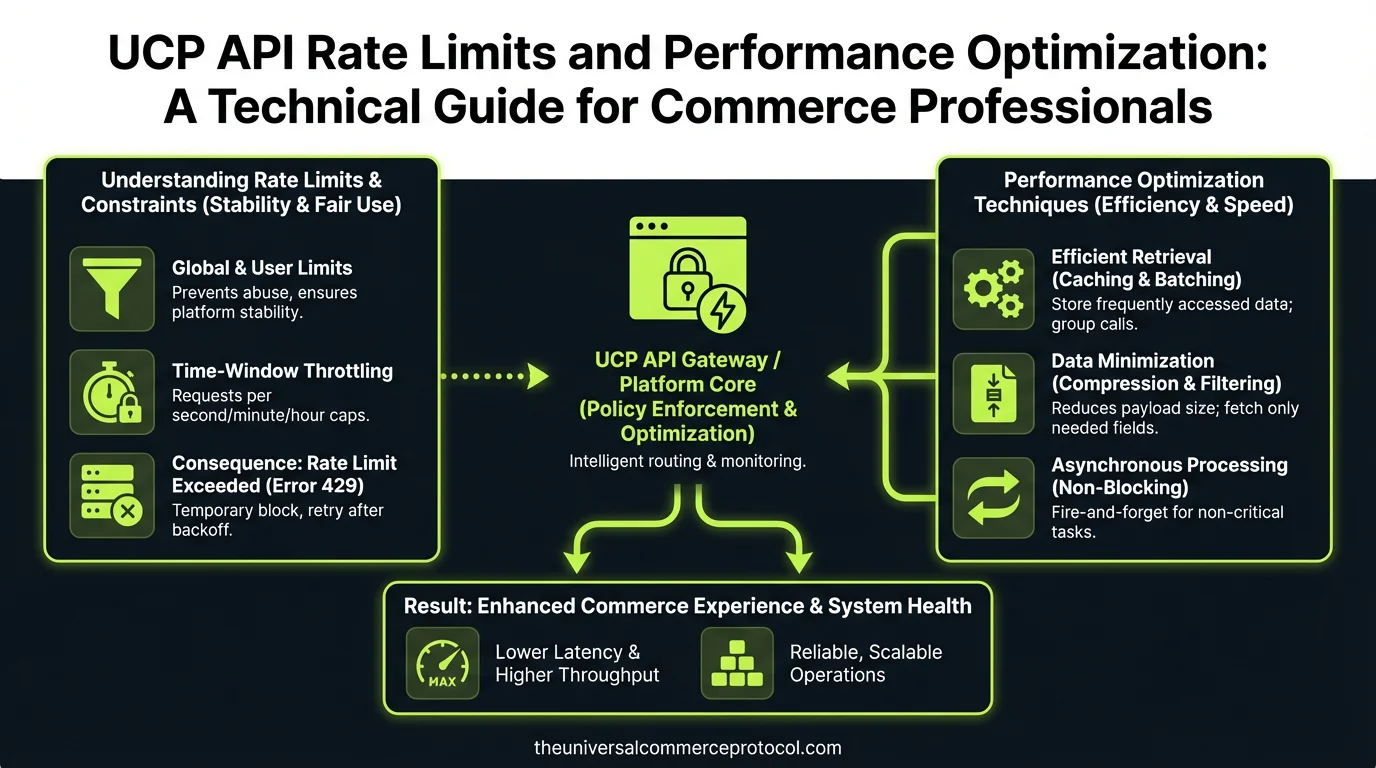
Understanding UCP API Rate Limits
The Universal Commerce Protocol implements rate limiting as a critical mechanism to ensure fair resource allocation, maintain system stability, and prevent abuse across its distributed network. Unlike traditional REST APIs with simple per-minute thresholds, UCP employs a sophisticated token bucket algorithm that distributes requests across multiple dimensions simultaneously.
Standard Rate Limit Tiers
UCP defines three primary rate limit tiers based on merchant classification and API key permissions:
- Starter Tier: 100 requests per second (RPS) with burst capacity of 500 RPS for 10 seconds. Ideal for small merchants processing under 50,000 transactions monthly.
- Professional Tier: 500 RPS sustained with 2,000 RPS burst capacity. Designed for mid-market retailers managing 50,000 to 500,000 monthly transactions.
- Enterprise Tier: 2,000 RPS sustained with custom burst configurations. Reserved for high-volume merchants exceeding 500,000 monthly transactions.
Each tier includes endpoint-specific limits. For example, the /orders endpoint may allow 1,000 requests per minute, while /inventory endpoints permit 500 requests per minute to prevent database contention.
Rate Limit Headers and Response Codes
When making UCP API calls, the response headers provide critical rate limit information:
X-RateLimit-Limit: Maximum requests allowed in the current windowX-RateLimit-Remaining: Requests remaining before hitting the limitX-RateLimit-Reset: Unix timestamp when the limit resetsX-RateLimit-Retry-After: Seconds to wait before retrying (sent with 429 responses)
Exceeding rate limits returns HTTP 429 (Too Many Requests). The response body includes detailed information about which specific limit was exceeded and when it resets.
Performance Optimization Strategies
Batch Processing and Request Consolidation
The most effective optimization technique involves consolidating multiple single requests into batch operations. UCP’s batch endpoint allows processing up to 100 operations in a single API call, reducing overhead by 95% compared to individual requests.
For example, instead of making 100 separate calls to update product inventory:
// Inefficient: 100 individual calls
for (let i = 0; i < products.length; i++) {
  await updateInventory(products[i].id, products[i].quantity);
}

// Optimized: Single batch call
const operations = products.map(p => ({
  method: 'PUT',
  path: `/inventory/${p.id}`,
  body: { quantity: p.quantity }
}));
await batch(operations);
Batch processing reduces API calls from 100 to 1, dramatically improving throughput while staying well within rate limits.
Implementing Intelligent Caching
Caching is essential for reducing redundant API calls. Implement a multi-layer caching strategy:
- In-Memory Cache: Cache frequently accessed data (product catalogs, customer profiles) for 5-15 minutes using Redis or Memcached. This eliminates 60-70% of API calls for typical commerce operations.
- Database Cache: Store API responses in your local database with TTL (time-to-live) values. Query your database first before hitting the API.
- Edge Cache: For read-only data like product information, implement edge caching at CDN level with 1-hour TTL.
UCP includes cache control headers indicating how long responses remain valid. Always respect the Cache-Control header and ETag values to implement proper cache invalidation.
Asynchronous Processing and Webhooks
Replace synchronous API polling with webhook-based event subscriptions. Instead of repeatedly calling the /orders endpoint to check order status:
- Subscribe to
order.created,order.updated, andorder.fulfilledevents - Receive real-time notifications via webhooks
- Reduce polling API calls by 90%+
This approach not only respects rate limits but provides real-time data accuracy, improving customer experience while reducing infrastructure costs.
Request Prioritization and Queuing
Implement a priority queue system for API requests:
- Critical Priority: Payment processing, order fulfillment (process immediately)
- High Priority: Inventory updates, customer queries (process within 1-5 seconds)
- Normal Priority: Analytics, reporting (process within 30 seconds)
- Low Priority: Historical data sync, maintenance tasks (process during off-peak hours)
This ensures critical commerce operations complete successfully while non-urgent tasks queue during high-traffic periods.
Advanced Optimization Techniques
Exponential Backoff and Retry Logic
When rate limits are exceeded, implement exponential backoff rather than immediate retries:
async function apiCallWithRetry(endpoint, maxRetries = 3) {
  for (let attempt = 0; attempt < maxRetries; attempt++) {
    try {
      return await callUCPAPI(endpoint);
    } catch (error) {
      if (error.status === 429) {
        const waitTime = Math.pow(2, attempt) * 1000; // 1s, 2s, 4s
        await sleep(waitTime);
        continue;
      }
      throw error;
    }
  }
}
This approach prevents thundering herd scenarios where multiple clients retry simultaneously, destabilizing the system.
Connection Pooling and HTTP/2
Configure your HTTP client to use connection pooling and HTTP/2 multiplexing:
- Maintain 10-50 persistent connections to UCP endpoints
- Enable HTTP/2 to multiplex multiple requests over single connections
- Reduce connection overhead by 40-60% compared to creating new connections per request
Most modern HTTP libraries (Node.js axios, Python requests, Go net/http) support these features with minimal configuration.
Filtering and Pagination Optimization
Use API filters to reduce data transfer and processing:
// Inefficient: Retrieve all orders then filter
const allOrders = await getOrders();
const pendingOrders = allOrders.filter(o => o.status === 'pending');

// Optimized: Filter at API level
const pendingOrders = await getOrders({ status: 'pending' });
Similarly, implement cursor-based pagination rather than offset pagination for large datasets. Cursor-based pagination is 10x faster for deep pagination and prevents rate limit exhaustion.
Data Aggregation and Denormalization
For complex queries requiring multiple API calls, consider maintaining denormalized data stores:
- Sync product catalogs to local database nightly via bulk export
- Maintain customer profile cache updated via webhooks
- Query local data for reporting and analytics instead of hitting APIs
This reduces live API calls by 70-80% while improving query performance by orders of magnitude.
Monitoring and Rate Limit Management
Real-Time Monitoring
Implement comprehensive monitoring to track rate limit consumption:
- Log all API responses including rate limit headers
- Alert when usage exceeds 70% of allocated limits
- Track which endpoints consume the most quota
- Identify patterns causing rate limit violations
Tools like DataDog, New Relic, or open-source Prometheus enable real-time visibility into API consumption patterns.
Capacity Planning
Analyze historical usage to forecast rate limit requirements:
- Calculate average requests per transaction
- Project transaction volume growth over 12 months
- Plan tier upgrades 2-3 months before hitting limits
- Budget for burst capacity during seasonal peaks
Most merchants should upgrade tiers when reaching 70% of sustained rate limits to maintain headroom for unexpected traffic spikes.
Common Rate Limiting Pitfalls to Avoid
Polling Instead of Webhooks: Many developers poll the /orders endpoint every 5 seconds, consuming 17,280 requests daily. Switching to webhooks eliminates this completely.
Lack of Caching: Retrieving the same product catalog 1,000 times daily wastes quota. Implement 15-minute caching to reduce calls to 96 daily.
Synchronous Batch Processing: Processing items sequentially instead of batching creates unnecessary latency and rate limit pressure. Always batch when possible.
Ignoring Rate Limit Headers: Not reading the X-RateLimit-Remaining header means you'll be surprised by 429 errors. Check headers proactively.
No Retry Strategy: Failing immediately on rate limits causes data loss and poor user experience. Implement exponential backoff universally.
Performance Benchmarks
Based on typical UCP implementations, here are achievable performance metrics:
- Without Optimization: 50-100 requests/second, frequent 429 errors, high latency
- With Batching: 500-1,000 requests/second equivalent throughput, 90% fewer API calls
- With Caching: 70% reduction in API calls, sub-100ms response times for cached data
- With Webhooks: Eliminates polling overhead, real-time data accuracy, 95%+ API call reduction
- Fully Optimized: 2,000-5,000 requests/second equivalent throughput, <50ms latency, near-zero rate limit violations
FAQ
What happens if I exceed my UCP rate limits?
UCP returns HTTP 429 (Too Many Requests) responses with the X-RateLimit-Retry-After header indicating how long to wait. Your requests fail and don't process, potentially causing incomplete transactions or data sync issues. Implement exponential backoff retry logic to handle this gracefully.
Can I request higher rate limits than my tier allows?
Yes. Contact your UCP account manager to request custom rate limits. Enterprise customers can negotiate limits up to 10,000+ RPS. Provide usage data, business justification, and implementation details showing how you'll optimize before requesting increases.
How do batch operations affect rate limits?
Batch operations count as single requests regardless of how many items they contain. A batch operation with 100 items counts as 1 request, not 100. This makes batching the most effective rate limit optimization technique available.
Should I cache all API responses?
No. Cache read-only data (products, categories) aggressively (15-60 minutes). Cache transactional data (orders, inventory) briefly (30 seconds to 5 minutes) to balance freshness with rate limit efficiency. Never cache sensitive data (payment info, PII) beyond session duration.
What's the difference between rate limits and throttling?
Rate limits are hard caps that return errors when exceeded. Throttling is soft limiting that slows responses gracefully without errors. UCP uses rate limiting with burst capacity—you can exceed sustained limits briefly before hitting hard limits.
What are the three UCP API rate limit tiers?
UCP offers three primary rate limit tiers: Starter Tier (100 RPS sustained, 500 RPS burst) for merchants processing under 50,000 transactions monthly; Professional Tier (500 RPS sustained, 2,000 RPS burst) for mid-market retailers with 50,000-500,000 monthly transactions; and Enterprise Tier (2,000 RPS sustained with custom burst configurations) for high-volume merchants exceeding 500,000 monthly transactions.
How does UCP's token bucket algorithm work for rate limiting?
Unlike traditional REST APIs with simple per-minute thresholds, UCP employs a sophisticated token bucket algorithm that distributes requests across multiple dimensions simultaneously. This approach ensures fair resource allocation, maintains system stability, and prevents abuse across the distributed network while allowing burst capacity when needed.
What is the difference between sustained and burst rate limits?
Sustained rate limits represent the consistent request capacity you can maintain continuously, while burst capacity allows temporary spikes above the sustained threshold for short periods. For example, the Starter Tier allows 100 sustained RPS but can handle up to 500 RPS in bursts lasting up to 10 seconds.
Are there endpoint-specific rate limits within each tier?
Yes, UCP includes endpoint-specific limits in addition to the general tier-based rate limits. Different API endpoints may have different rate limiting configurations to optimize performance and resource allocation across various commerce functions.
Which tier should I choose based on my transaction volume?
Select your tier based on monthly transaction volume: Starter Tier for under 50,000 transactions, Professional Tier for 50,000-500,000 transactions, and Enterprise Tier for merchants exceeding 500,000 monthly transactions. Choose the tier that accommodates your current and projected growth needs.
Frequently Asked Questions
What is the Universal Commerce Protocol (UCP)?
The Universal Commerce Protocol (UCP) is an open standard developed to enable AI agents to autonomously conduct commerce transactions across any platform.
How does UCP enable agentic commerce?
UCP provides standardized APIs and protocols so AI agents can discover products, negotiate terms, and complete purchases without human intervention, working across any compatible commerce platform.
Why should businesses implement UCP?
UCP adoption reduces integration costs, opens revenue channels to AI-driven buyers, and future-proofs commerce infrastructure as agentic purchasing becomes mainstream.
Leave a Reply