Understanding UCP Webhooks and Their Role in Modern Commerce
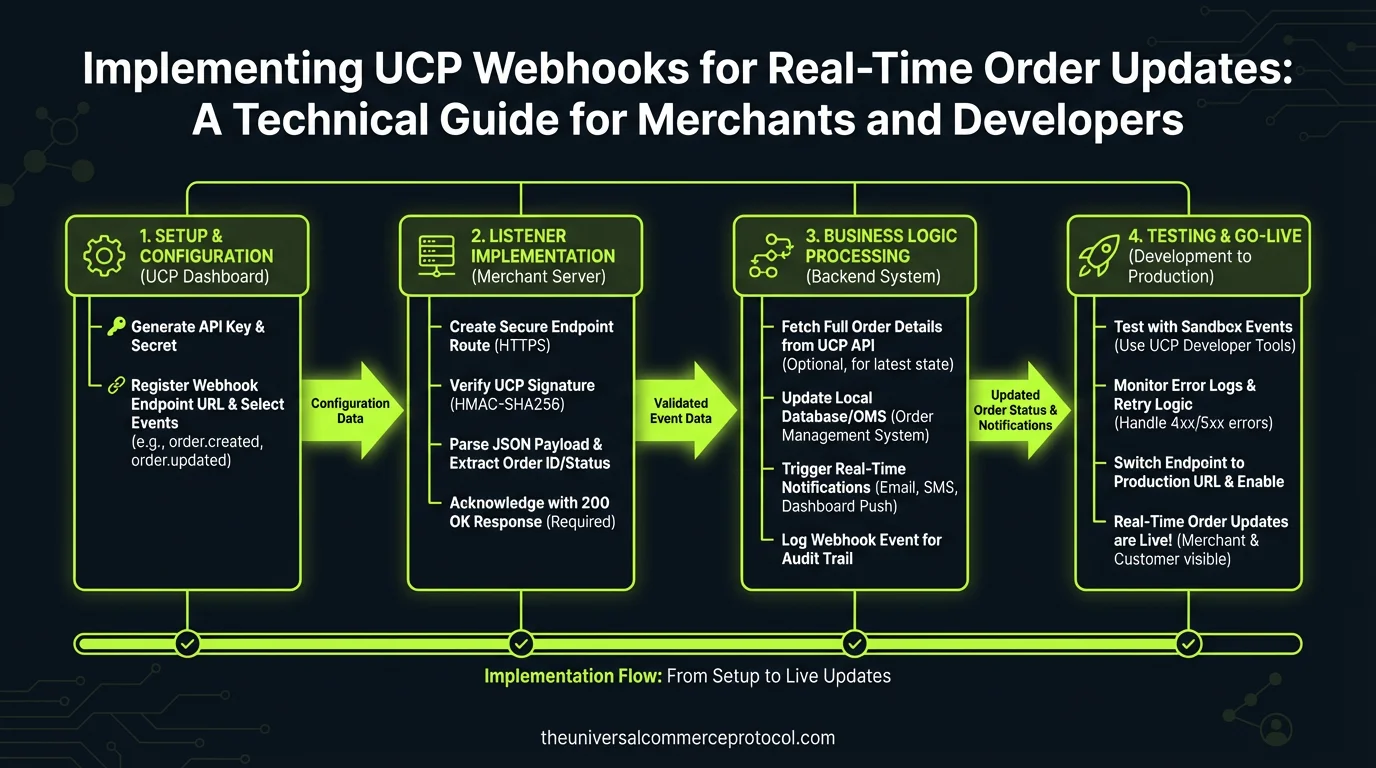
Universal Commerce Protocol (UCP) webhooks represent a fundamental shift in how merchants and commerce platforms communicate order information in real-time. Rather than relying on periodic polling or manual status checks, webhooks enable event-driven architecture where order updates are immediately pushed to designated endpoints whenever significant events occur.
Webhooks are HTTP callbacks that fire automatically when specific events happen within a UCP-enabled commerce system. When a customer completes a purchase, payment processes, or inventory changes, your systems receive an instant notification with structured data about what occurred. This eliminates latency, reduces server load, and enables merchants to respond immediately to order events.
Related articles: UCP Shipping Carrier Selection & Rate Optimization • UCP Security Best Practices for AI-Driven Commerce
Core Benefits of Implementing UCP Webhooks
Real-Time Fulfillment Coordination
Implementing webhooks allows your fulfillment systems to receive order information the moment it’s created. Warehouse management systems can automatically begin picking and packing processes without manual intervention. This reduces order-to-shipment time from hours to minutes, directly improving customer satisfaction metrics and competitive positioning.
Improved Customer Communication
With real-time webhook updates, your customer service systems can automatically send order confirmations, payment confirmations, and shipment notifications without delay. Customers receive accurate status updates at each stage, reducing support inquiries and improving perceived service quality.
Reduced Operational Overhead
Event-driven architectures eliminate the need for scheduled batch jobs that constantly query order status. This significantly reduces database load, decreases infrastructure costs, and frees developer resources for higher-value features rather than maintenance tasks.
Enhanced Data Accuracy
Webhooks deliver consistent, structured data in standardized formats. This reduces manual data entry errors and ensures that all connected systems remain synchronized across your entire commerce ecosystem.
UCP Webhook Event Types and Payloads
Standard Order Events
UCP webhooks typically support several core event types. The order.created event fires immediately after order placement, containing complete order details, line items, customer information, and shipping address. The order.confirmed event indicates payment has been successfully processed and the order is ready for fulfillment.
The order.shipped event includes tracking information and carrier details. The order.delivered event confirms successful delivery. Additional events include order.cancelled, order.refunded, and order.modified for updates to existing orders.
Payment-Related Events
Payment events include payment.authorized, payment.captured, payment.failed, and payment.disputed. These events carry payment method information, authorization codes, and failure reasons when applicable. Merchants can use these events to trigger different workflows based on payment status.
Inventory and Fulfillment Events
Events like inventory.reserved, inventory.released, and fulfillment.initiated help coordinate between commerce platforms and inventory management systems. These events ensure accurate stock levels across channels and prevent overselling scenarios.
Setting Up Your UCP Webhook Endpoint
Endpoint Configuration Requirements
Your webhook endpoint must be a publicly accessible HTTPS URL that accepts POST requests. The endpoint should respond with a 200 status code within 30 seconds of receiving a webhook. Most UCP implementations expect responses in under 5 seconds for optimal performance.
The endpoint URL should be specific and versioned, such as https://api.yourmerchant.com/v1/webhooks/ucp/orders. Avoid generic paths that might conflict with other integrations. Include version numbers to allow for future updates without breaking existing implementations.
Authentication and Security
UCP webhooks must be authenticated to prevent unauthorized requests. Most implementations use HMAC-SHA256 signatures. Your UCP provider generates a signing secret that’s used to create a signature for each webhook payload. Your endpoint verifies this signature by recalculating it with your secret and comparing it to the provided signature.
The signature is typically included in an X-UCP-Signature header. The payload is signed in its raw, unparsed form before JSON parsing. This prevents signature verification issues caused by JSON formatting variations.
const crypto = require(crypto);
const secret = process.env.UCP_WEBHOOK_SECRET;

function verifyWebhookSignature(payload, signature) {
  const hash = crypto
    .createHmac(sha256, secret)
    .update(payload, utf8)
    .digest(hex);

  return crypto.timingSafeEqual(
    Buffer.from(hash),
    Buffer.from(signature)
  );
}
Idempotency and Duplicate Handling
Network issues can cause webhooks to be delivered multiple times. Each webhook includes a unique id field and a timestamp. Store received webhook IDs in a database or cache with a 24-hour retention period. Before processing any webhook, check if its ID has already been processed. If it has, return 200 immediately without re-processing.
async function handleWebhook(req, res) {
  const webhookId = req.body.id;

  // Check if already processed
  const existing = await redis.get(`webhook:${webhookId}`);
  if (existing) {
    return res.status(200).json({ processed: false, reason: duplicate });
  }

  // Process webhook
  await processOrderUpdate(req.body);

  // Mark as processed
  await redis.setex(`webhook:${webhookId}`, 86400, processed);

  res.status(200).json({ processed: true });
}
Implementing Webhook Processing Workflows
Asynchronous Processing Pattern
Your webhook endpoint should acknowledge receipt immediately and defer heavy processing to background jobs. This prevents timeouts and ensures the UCP provider doesn’t retry due to slow processing. Queue the webhook data to a job queue like Redis Queue, AWS SQS, or RabbitMQ, then return 200 to the webhook sender.
Background workers process queued webhooks asynchronously, updating inventory systems, triggering fulfillment processes, and sending customer notifications. This decoupling ensures webhook delivery isn’t blocked by downstream system latency.
Error Handling and Retry Logic
When background processing fails, implement exponential backoff retry logic. After the first failure, retry after 30 seconds. After the second failure, retry after 5 minutes. Continue with increasing intervals up to 24 hours. Log all failures with context for debugging.
Some errors are transient (database connection timeout) while others are permanent (malformed data). Implement logic to distinguish between them. Transient errors trigger retries; permanent errors are logged and escalated to support teams.
Webhook Payload Transformation
UCP webhook payloads follow a standardized schema, but your internal systems may use different data structures. Implement transformation layers that map UCP data to your internal formats. This decouples your systems from UCP structure changes and makes future migrations easier.
function transformUCPOrder(ucpOrder) {
  return {
    internalOrderId: generateInternalId(),
    externalOrderId: ucpOrder.id,
    customer: {
      id: ucpOrder.customer.id,
      email: ucpOrder.customer.email,
      name: ucpOrder.customer.name
    },
    items: ucpOrder.line_items.map(item => ({
      sku: item.sku,
      quantity: item.quantity,
      price: item.price_cents / 100
    })),
    shipping: {
      address: ucpOrder.shipping_address,
      method: ucpOrder.shipping_method,
      cost: ucpOrder.shipping_cost_cents / 100
    },
    total: ucpOrder.total_cents / 100,
    timestamp: new Date(ucpOrder.created_at)
  };
}
Monitoring and Observability
Webhook Delivery Tracking
Maintain detailed logs of all webhook deliveries including timestamp, event type, payload hash, processing duration, and outcome. This audit trail is invaluable for debugging issues and understanding system behavior. Store logs in a searchable system like ELK Stack or Datadog.
Alerting on Delivery Failures
Set up alerts when webhook processing fails repeatedly or when expected webhooks don’t arrive within expected timeframes. For example, alert if no order.confirmed webhook arrives within 5 minutes of order creation. These alerts catch integration issues before they impact customers.
Performance Metrics
Track webhook processing latency from receipt to completion. Monitor queue depths to identify bottlenecks. Set up dashboards showing webhook delivery success rates, average processing times, and error rates by event type. These metrics help you identify optimization opportunities and capacity planning needs.
Testing and Validation
Local Development Testing
Use tools like ngrok or localtunnel to expose your local development environment to the internet, allowing UCP to deliver webhooks during development. Alternatively, mock webhook events in your test suite to validate processing logic without depending on external systems.
Webhook Replay and Debugging
Most UCP providers offer webhook management dashboards where you can view delivery history and replay failed webhooks. Use this feature to test your endpoint’s handling of specific events and to retry processing when your systems were temporarily unavailable.
Best Practices and Recommendations
Timeout and Rate Limiting
Set aggressive timeouts on all downstream system calls within your webhook handler. If your inventory system doesn’t respond within 5 seconds, fail the webhook processing and let the retry logic handle it. This prevents webhook handlers from hanging indefinitely.
Data Validation
Validate all webhook payload data before processing. Check that required fields are present, data types are correct, and values are within expected ranges. Invalid data should be logged and escalated rather than causing silent failures.
Version Management
As UCP evolves, webhook payloads may change. Include API version information in your endpoint path and handle multiple versions. This allows you to deprecate old formats gradually rather than requiring simultaneous updates across all systems.
Common Implementation Challenges
Handling Out-of-Order Events
Network delays can cause webhooks to arrive out of sequence. An order.shipped event might arrive before order.confirmed. Store events with timestamps and process them in chronological order rather than receipt order. Implement state machines that validate state transitions are logical.
Scaling to High Volume
As order volume grows, webhook processing must scale. Use horizontal scaling with multiple webhook handler instances behind a load balancer. Implement queue-based processing to decouple receipt from processing. Consider using serverless functions for bursty workloads.
Maintaining Backward Compatibility
When UCP adds new fields to webhook payloads, your parser must handle both old and new formats gracefully. Use optional field parsing that doesn’t break when encountering unknown fields. This allows you to deploy updates independently of UCP changes.
FAQ
How often should webhooks be retried if delivery fails?
UCP typically retries webhooks using exponential backoff for 24-48 hours. Your endpoint should implement its own retry logic for downstream processing failures. Use exponential backoff with jitter to avoid thundering herd problems. Most implementations retry immediately, then at 30 seconds, 5 minutes, 30 minutes, and 24 hours.
What’s the maximum payload size for UCP webhooks?
Most UCP implementations support payloads up to 1MB. However, best practices recommend keeping payloads under 100KB by excluding unnecessary data. If you need additional information, use the webhook data as a trigger to fetch full details from the API rather than including everything in the payload.
Can I receive webhooks for historical orders?
No, webhooks only trigger for new events going forward. To sync historical orders, use the UCP REST API to query existing orders. Implement a one-time sync process that fetches all orders from a specific date range, then enable webhooks for future orders.
How do I test webhook endpoints before going live?
Use the UCP sandbox environment to test webhooks with test orders. Most providers allow you to manually trigger webhook deliveries from their dashboard. Implement comprehensive unit tests for your webhook handler logic. Use contract testing to validate your endpoint accepts the expected UCP payload format.
What should I do if my webhook processing is consistently slow?
Profile your webhook handler to identify bottlenecks. Common issues include synchronous database queries, external API calls without timeouts, and missing database indexes. Move slow operations to background jobs. Implement caching for frequently accessed data. Consider using connection pooling for database connections.
What are UCP webhooks and how do they work?
UCP (Universal Commerce Protocol) webhooks are HTTP callbacks that automatically fire when specific events occur in a commerce system. Instead of manually checking for updates, webhooks instantly push order information and event data to your designated endpoints whenever significant transactions or status changes happen, enabling real-time communication between your systems and the commerce platform.
What are the main benefits of implementing UCP webhooks for my business?
The primary benefits include real-time fulfillment coordination, immediate order notifications, reduced server load compared to polling systems, eliminated latency in order processing, and the ability to automate workflows. These features enable faster order-to-shipment times, better inventory management, and improved customer experience through instant status updates.
How do webhooks improve fulfillment operations?
Webhooks enable automatic fulfillment coordination by sending order information instantly to warehouse management systems the moment a purchase is completed. This allows warehouse teams to immediately begin picking and packing processes without manual intervention, significantly reducing order-to-shipment time and operational delays.
What’s the difference between webhooks and traditional polling methods?
Webhooks use an event-driven architecture where data is pushed to you automatically when events occur, eliminating latency and reducing server load. Traditional polling requires your system to repeatedly check for updates at intervals, which is less efficient, creates unnecessary traffic, and introduces delays in receiving information.
What types of events trigger UCP webhooks?
Common webhook triggers include customer purchase completion, payment processing events, order status changes, inventory updates, and fulfillment milestones. These events generate structured data notifications that are immediately sent to your configured endpoints, allowing your systems to respond automatically to commerce events.
Leave a Reply