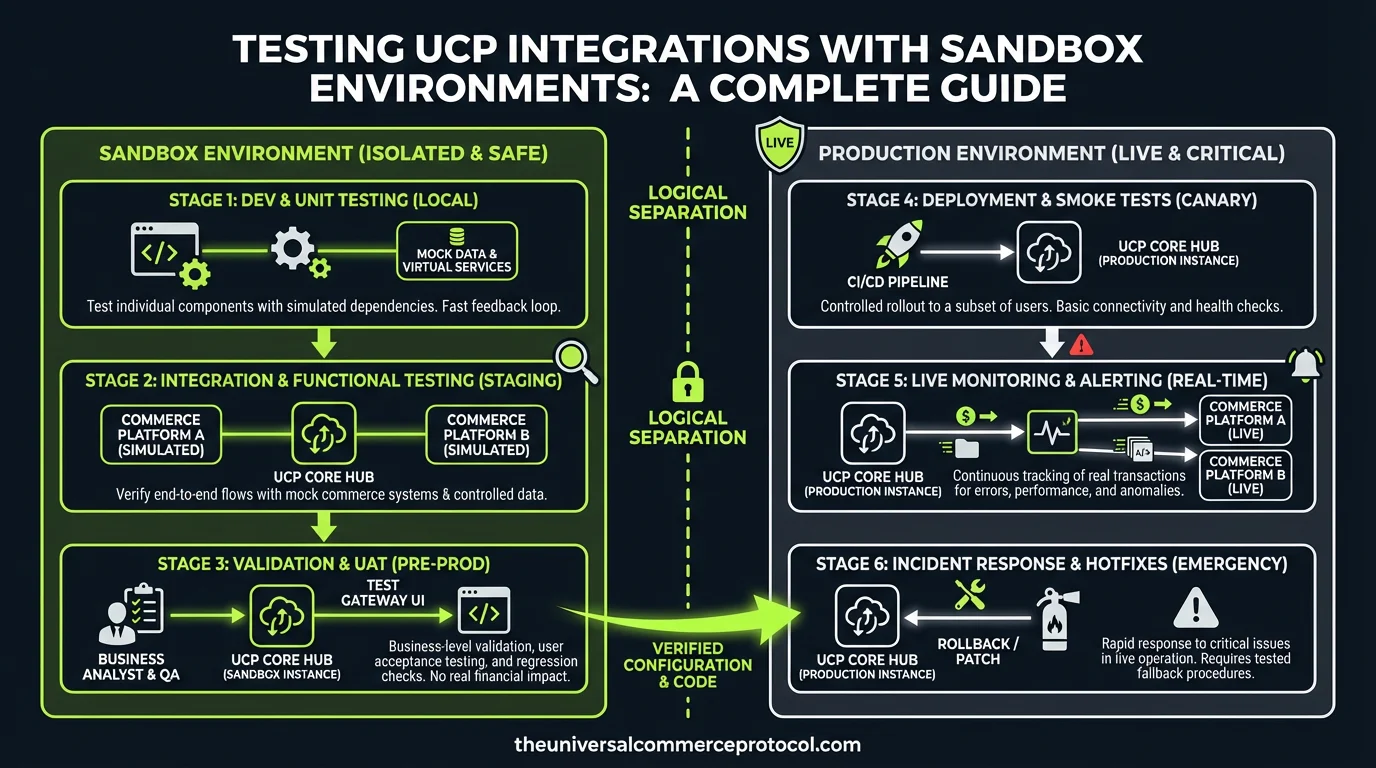
Testing UCP Integrations with Sandbox Environments: A Complete Guide
The Universal Commerce Protocol (UCP) enables seamless commerce experiences across multiple channels and touchpoints. However, before deploying any UCP integration to production, thorough testing in sandbox environments is critical. This comprehensive guide covers everything merchants, developers, and commerce professionals need to know about validating UCP integrations safely and effectively.
Understanding UCP Sandbox Environments
A sandbox environment is an isolated testing space that mimics production conditions without affecting real transactions or customer data. For UCP integrations, sandbox environments provide a risk-free space to validate API calls, test payment flows, verify order workflows, and ensure system stability.
Related articles: UCP Shipping Carrier Selection & Rate Optimization • UCP Security Best Practices for AI-Driven Commerce
Key Characteristics of UCP Sandbox Environments
UCP sandbox environments replicate the complete production architecture while using test credentials and simulated data. They include mock payment processors, test fulfillment systems, and simulated shipping carriers. All transactions remain isolated from live systems, allowing unlimited testing without incurring costs or affecting real customers. Sandbox environments typically provide identical API endpoints to production, differing only in the base URL and authentication credentials.
Most UCP providers offer multiple sandbox instances, allowing teams to test different scenarios simultaneously. These environments maintain consistent uptime for testing purposes and include comprehensive logging and debugging capabilities unavailable in production.
Setting Up Your UCP Sandbox Testing Environment
Prerequisites and Initial Configuration
Before beginning UCP integration testing, establish your sandbox credentials through your UCP provider’s developer portal. You’ll receive a sandbox API key, merchant ID, and test authentication tokens. Document these credentials securely, as they’re essential for all API requests during testing.
Configure your development environment to use sandbox endpoints. Typically, sandbox URLs follow patterns like https://sandbox-api.ucp.example.com/v1/ versus production URLs like https://api.ucp.example.com/v1/. Update your application’s configuration files to use sandbox endpoints during development and testing phases.
Install required SDKs and libraries for your technology stack. UCP providers typically offer SDKs for popular languages including JavaScript, Python, Java, and PHP. These SDKs handle authentication, request formatting, and error handling automatically.
Environment Variables and Configuration Management
Implement environment-specific configuration using variables rather than hardcoded values. Store sandbox credentials in environment files or configuration management systems separate from source code. This approach prevents accidental exposure of credentials and simplifies switching between sandbox and production environments.
Create a configuration hierarchy: development (sandbox), staging (sandbox), and production (live). Each environment should have distinct credentials and API endpoints. Use configuration management tools like HashiCorp Vault, AWS Secrets Manager, or similar solutions for secure credential storage.
Test Data Management and Scenarios
Creating Realistic Test Data
Effective testing requires comprehensive test data that mirrors real-world scenarios. Create test customer profiles with various attributes: different geographic locations, payment methods, loyalty status, and purchase histories. This diversity ensures your integration handles different customer segments correctly.
Develop test product catalogs including physical goods, digital products, and services. Include items with different pricing structures, tax categories, weight ranges, and fulfillment methods. This variety validates that your integration correctly processes diverse product types through UCP.
Establish test orders representing common business scenarios: single-item purchases, multi-item orders, orders with discounts, orders requiring address validation, and orders with special fulfillment requirements. Include edge cases like orders exceeding inventory, orders with conflicting items, and orders requiring manual review.
Payment Testing Scenarios
UCP sandbox environments include test payment card numbers that trigger specific responses. Use card number 4111111111111111 to simulate successful transactions. Card 4000000000000002 triggers declined responses, testing your error handling. Other test numbers simulate various decline reasons: insufficient funds, expired cards, and fraud flags.
Test multiple payment methods: credit cards, digital wallets, bank transfers, and alternative payment systems. Each method may follow different UCP workflows, and comprehensive testing ensures your integration handles all supported payment types. Document which test card numbers correspond to which scenarios for consistent testing.
API Integration Testing
Validating Core UCP Endpoints
Begin testing with fundamental UCP endpoints: order creation, order retrieval, and order status updates. Submit a test order through your integration and verify the API returns expected responses. Check that order IDs, timestamps, and merchant references are correctly formatted and stored.
Test error scenarios systematically. Submit invalid requests missing required fields, requests with malformed data, and requests exceeding rate limits. Verify your application handles each error type appropriately, logging errors without crashing and displaying user-friendly error messages.
Validate all required and optional parameters for each endpoint. For order creation, test with and without optional fields like gift messages, special instructions, and customer notes. Ensure your integration correctly processes responses whether optional fields are included or omitted.
Testing Webhook Implementations
UCP webhooks deliver real-time order updates including payment confirmations, fulfillment status changes, and shipment tracking information. Configure your webhook endpoint URL in the sandbox environment and verify it receives test events from UCP.
Test webhook authentication by validating signatures on incoming webhook payloads. UCP signs webhooks using HMAC-SHA256, and your application must verify these signatures to ensure events originated from UCP. Implement signature validation before processing any webhook data.
Simulate various webhook scenarios: successful payment confirmations, payment failures, order fulfillment, shipment updates, and delivery confirmations. Verify your application processes each event type correctly and maintains accurate order status throughout the lifecycle.
Transaction Flow Testing
End-to-End Order Processing
Execute complete order workflows from cart to delivery confirmation. Begin with a test customer adding items to a cart, applying promotional codes, selecting shipping methods, and proceeding to checkout. Process payment using test credentials and verify the order successfully creates in the UCP system.
Monitor order progression through each stage: payment authorization, payment capture, inventory allocation, fulfillment preparation, shipment, and delivery. Verify webhooks fire at appropriate stages and your system correctly updates order status in response to each event.
Test order modifications during various stages: cancellations before fulfillment, returns after shipment, and partial refunds. Ensure your integration correctly handles these scenarios and maintains accurate financial records.
Multi-Channel Order Testing
If your UCP integration spans multiple sales channels (website, mobile app, social commerce, marketplace), test order creation from each channel. Verify that UCP correctly attributes orders to their source channel and that channel-specific data (like marketplace order IDs) is properly captured and maintained.
Test inventory synchronization across channels. Create orders simultaneously from different channels and verify inventory levels update correctly in real-time, preventing overselling scenarios.
Performance and Load Testing
Baseline Performance Metrics
Establish performance baselines for critical operations. Measure API response times for order creation, order retrieval, and inventory queries. Document acceptable response times based on your business requirements—typically, order creation should complete within 2-3 seconds.
Test API performance under normal load: simulate typical transaction volumes your system expects during regular business hours. Monitor response times, error rates, and system resource utilization. Identify any performance degradation compared to baseline metrics.
Load Testing and Stress Testing
Conduct load testing by gradually increasing transaction volume until reaching your system’s capacity. Use load testing tools like Apache JMeter, Locust, or cloud-based solutions to simulate concurrent users and transactions. Monitor system behavior as load increases and identify the point where performance degrades.
Perform stress testing by exceeding your expected peak load. This testing reveals how your system behaves under extreme conditions and helps identify breaking points. Document how your integration gracefully handles overload scenarios—proper error handling is critical during high-traffic periods.
Security and Compliance Testing
Data Security Validation
Verify that sensitive data (payment information, customer PII, authentication credentials) is never logged or stored in plain text. Test that API communications use HTTPS encryption and that SSL/TLS certificates are valid. Validate that your integration doesn’t expose sensitive data in error messages or logs.
Test authentication mechanisms thoroughly. Verify that invalid API keys are rejected, that expired tokens are properly handled, and that authentication failures don’t leak information about valid credentials.
PCI Compliance Considerations
Ensure your integration never handles raw payment card data. UCP should tokenize payment information, and your system should only work with tokens. Verify that payment data flows directly from the customer’s browser to UCP’s payment processor, bypassing your servers entirely.
Test that your integration complies with PCI DSS requirements: data is encrypted in transit and at rest, access controls are properly implemented, and audit logging captures all sensitive operations.
Common Testing Pitfalls and Solutions
Inadequate Test Data Coverage
Many integrations fail in production because sandbox testing didn’t include sufficient edge cases. Ensure your test data covers geographic variations, different product types, various payment methods, and exceptional scenarios. Create a comprehensive test matrix documenting all scenarios and their expected outcomes.
Ignoring Sandbox Limitations
Sandbox environments may not perfectly replicate production behavior. Some third-party integrations (like certain shipping carriers or payment processors) may not be fully available in sandbox. Document these limitations and plan accordingly for production deployment.
Insufficient Logging and Monitoring
Implement comprehensive logging during sandbox testing. Log all API requests, responses, webhooks, and errors. This logging proves invaluable when debugging issues and understanding system behavior. Use structured logging formats (JSON) to enable easy analysis and searching.
Pre-Production Validation Checklist
- All core UCP endpoints tested successfully with valid and invalid inputs
- Webhooks configured and receiving test events correctly
- Payment processing tested with multiple payment methods
- End-to-end order workflows validated from cart to delivery
- Performance meets or exceeds baseline requirements
- Error handling tested and verified for all failure scenarios
- Security validations completed and documented
- Data synchronization tested across all integrated systems
- Logging and monitoring configured appropriately
- Documentation completed for operations team
Transitioning to Production
After comprehensive sandbox testing, transition to production gradually. Many organizations use a phased rollout: production deployment to a small percentage of traffic, monitoring for issues, then gradually increasing traffic volume. This approach catches production-specific issues while minimizing customer impact.
Maintain sandbox access even after production deployment. Use sandbox for testing new features, validating updates, and troubleshooting issues. Sandbox remains valuable throughout your integration’s lifecycle.
FAQ: Testing UCP Integrations with Sandbox Environments
How long does UCP sandbox testing typically take?
Testing duration depends on integration complexity and scope. Basic integrations may complete in 1-2 weeks, while complex multi-channel implementations may require 4-8 weeks. Factor in time for initial setup, test data creation, testing execution, bug fixes, and retesting. Build buffer time into project schedules to accommodate unexpected issues.
Can I use production data in sandbox environments?
No. Never use production data in sandbox environments due to security and privacy concerns. Sandbox environments are less secure than production, and exposing real customer data violates privacy regulations. Always use synthetic test data that mimics production patterns without containing real information.
What should I do if sandbox behavior differs from production?
Document the differences and contact your UCP provider’s support team. Some differences are expected due to sandbox limitations, but significant behavioral differences indicate potential issues. Work with the provider to understand whether differences are intentional, temporary, or indicate problems requiring resolution before production deployment.
How often should I retest after updating my integration?
Retest whenever making code changes, updating dependencies, or modifying configuration. Implement regression testing—retesting previously validated scenarios to ensure updates didn’t break existing functionality. For minor updates, focused testing on changed areas may suffice. For major updates, comprehensive retesting is necessary.
What metrics should I monitor during sandbox testing?
Monitor API response times, error rates, successful transaction percentages, webhook delivery success rates, and system resource utilization. Track these metrics over time to identify trends and ensure performance remains acceptable. Compare metrics against baseline expectations and investigate any significant deviations.
What is a UCP sandbox environment and why is it important?
A UCP sandbox environment is an isolated testing space that mimics production conditions without affecting real transactions or customer data. It’s critical for merchants and developers to thoroughly test UCP integrations before deploying to production, allowing validation of API calls, payment flows, order workflows, and system stability in a risk-free environment.
What features are included in UCP sandbox environments?
UCP sandbox environments replicate the complete production architecture while using test credentials and simulated data. Key features include mock payment processors, test fulfillment systems, and simulated shipping carriers. All transactions remain isolated from live systems, allowing unlimited testing without incurring costs.
How does testing in a sandbox environment protect my business?
Sandbox testing protects your business by enabling you to identify and fix issues before they impact real customers or transactions. You can validate integrations, test payment flows, verify order workflows, and ensure system stability without any risk to your production environment or customer data.
Can I test unlimited scenarios in the UCP sandbox?
Yes, UCP sandbox environments allow unlimited testing without incurring costs. Since all transactions are simulated and isolated from live systems, you can conduct as many tests as needed to validate your integration thoroughly before going live.
What should be validated when testing UCP integrations in a sandbox?
When testing UCP integrations in sandbox environments, you should validate API calls, payment flows, order workflows, and overall system stability. This comprehensive testing ensures your integration is ready for production deployment and will provide seamless commerce experiences across multiple channels and touchpoints.
Leave a Reply