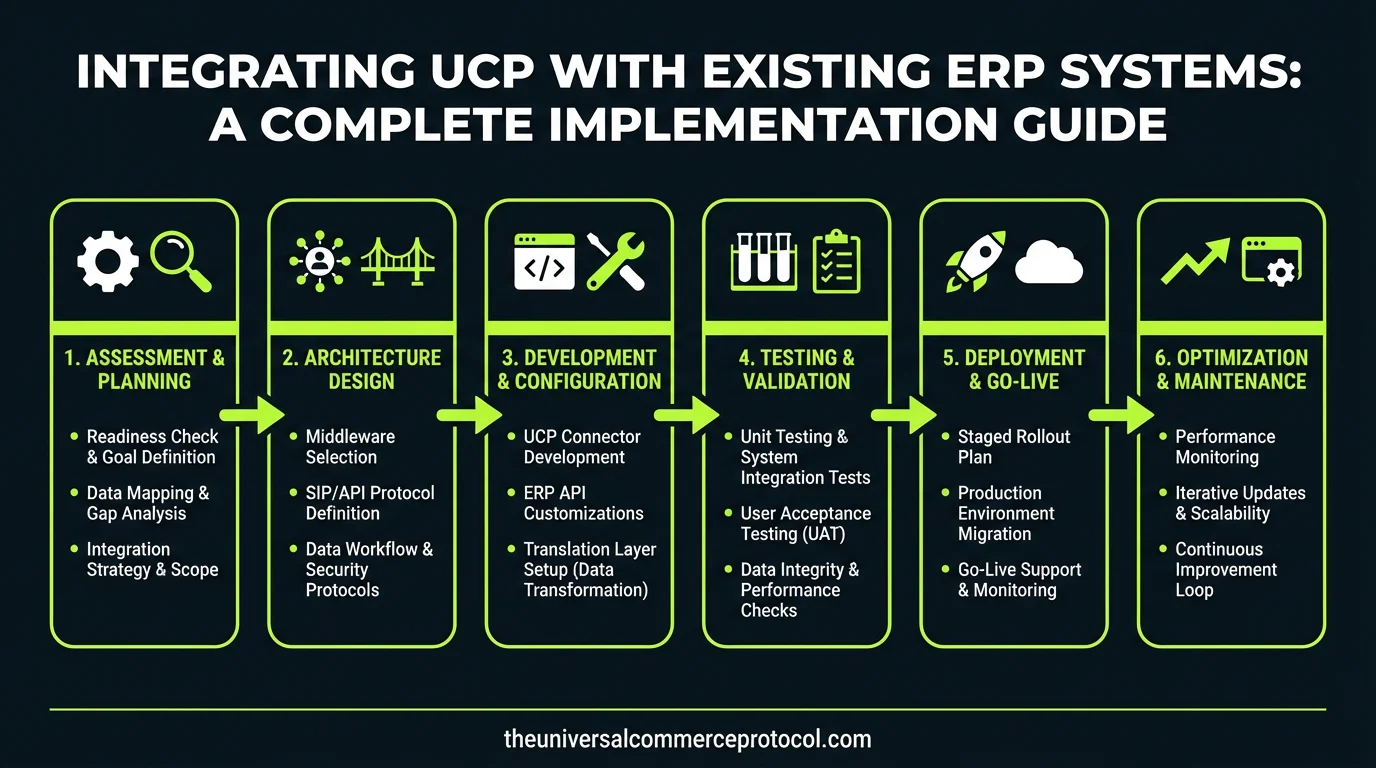
Integrating UCP with Existing ERP Systems: A Complete Implementation Guide
Enterprise Resource Planning (ERP) systems form the backbone of modern commerce operations, managing inventory, accounting, supply chain, and customer data. However, as businesses expand into omnichannel commerce, integrating the Universal Commerce Protocol (UCP) with legacy ERP systems presents both challenges and opportunities. This comprehensive guide explores the technical and strategic considerations for successful UCP-ERP integration.
Understanding the Integration Challenge
Why ERP-UCP Integration Matters
Modern commerce demands real-time synchronization across multiple channels—online stores, mobile apps, physical locations, and third-party marketplaces. Your ERP system holds critical data about inventory levels, pricing, customer information, and order history. UCP provides the standardized protocol for unified commerce transactions, but without proper integration, data silos emerge that lead to overselling, pricing inconsistencies, and poor customer experiences.
Related articles: UCP Shipping Carrier Selection & Rate Optimization • UCP Security Best Practices for AI-Driven Commerce
The integration challenge stems from several factors: ERP systems were typically designed for traditional supply chain management, not real-time omnichannel commerce. UCP, being a modern protocol built for distributed commerce networks, operates on different assumptions about data flow, latency tolerance, and transaction processing. Successfully bridging these systems requires careful architectural planning.
Common Integration Obstacles
Organizations frequently encounter predictable obstacles during ERP-UCP integration:
- Legacy System Limitations: Older ERP platforms may lack modern APIs or real-time data synchronization capabilities
- Data Format Incompatibility: ERP systems use proprietary data structures that don’t map directly to UCP schemas
- Latency Issues: Traditional ERP batch processing conflicts with UCP’s real-time requirements
- Authentication Complexity: Integrating multiple authentication systems across platforms
- Regulatory Compliance: Ensuring data handling meets industry standards during integration
Architecture and Planning for Integration
Assessing Your Current ERP Environment
Before implementing UCP integration, conduct a comprehensive audit of your existing ERP system. Document current API capabilities, data refresh cycles, system load capacity, and integration points already in use. Identify which ERP modules interact with commerce operations: inventory management, order processing, customer master data, and financial accounting.
Determine your ERP’s current integration maturity. Does it support REST APIs, SOAP web services, or only file-based integration? What message queuing systems are already deployed? Understanding these capabilities informs whether you can build direct connections or need middleware solutions.
Defining Integration Scope
Not all ERP functions require real-time UCP integration. Prioritize based on business impact. Most implementations start with three core areas:
Inventory Synchronization: Real-time stock level updates prevent overselling across channels. This typically has the highest ROI and lowest complexity.
Order Management: UCP orders must flow into your ERP’s order processing module, triggering fulfillment workflows and financial recording.
Customer Master Data: Synchronizing customer profiles ensures consistent pricing, loyalty points, and personalization across channels.
Define which data flows are unidirectional and which require bidirectional synchronization. Inventory typically flows from ERP to UCP (pull model), while orders flow from UCP to ERP (push model).
Integration Approaches and Middleware Solutions
Direct API Integration
For modern ERP systems with robust APIs (SAP S/4HANA, Oracle Cloud, NetSuite), direct integration is often viable. This approach involves building custom connectors that translate UCP requests into ERP API calls and vice versa.
Direct integration advantages include lower latency, reduced infrastructure overhead, and simpler debugging. However, it requires deep knowledge of both UCP specifications and your specific ERP’s API documentation. Maintenance becomes challenging if either system updates their API.
Implement circuit breakers and retry logic to handle ERP API failures gracefully. UCP transactions shouldn’t fail if temporary ERP connectivity issues occur—queue the transaction and retry asynchronously.
Middleware and Integration Platforms
iPaaS (Integration Platform as a Service) solutions like MuleSoft, Boomi, or Informatica provide pre-built connectors for popular ERP systems and can be configured to handle UCP protocol requirements. These platforms offer significant advantages for organizations with complex IT environments.
Middleware platforms provide:
- Pre-built ERP connectors reducing development time
- Visual mapping tools for data transformation
- Built-in error handling and monitoring
- Scalability without custom infrastructure management
- Audit trails for compliance documentation
The trade-off is cost—iPaaS solutions involve licensing fees and may introduce latency compared to direct integration. However, for enterprises managing multiple ERP instances or frequent system changes, the operational benefits justify the investment.
Event-Driven Architecture with Message Queues
For organizations prioritizing reliability and decoupling, implement an event-driven architecture using message queues (RabbitMQ, Apache Kafka, AWS SQS). In this model, UCP events trigger messages that ERP systems consume asynchronously.
This approach provides several benefits:
- Loose coupling between UCP and ERP systems
- Built-in retry mechanisms and dead-letter handling
- Ability to scale message processing independently
- Audit trails for all commerce transactions
- Support for multiple subscribers (analytics, reporting, etc.)
The primary consideration is ensuring eventual consistency—while messages queue reliably, there may be brief periods where ERP and UCP data diverge. This is acceptable for most commerce scenarios but requires careful handling for inventory updates.
Data Mapping and Transformation
Inventory Data Mapping
Inventory synchronization requires translating between ERP inventory concepts and UCP structures. ERP systems often track inventory at warehouse or bin levels with complex allocation rules. UCP requires simplified availability data: total available quantity, reserved quantity, and fulfillment location.
Create a mapping specification document that defines how your ERP’s inventory hierarchy translates to UCP availability states. For example:
- ERP “Available Stock” = UCP “available_quantity”
- ERP “Reserved for Orders” = UCP “reserved_quantity”
- ERP “Warehouse Location” = UCP “fulfillment_location_id”
Implement inventory synchronization with appropriate frequency. Real-time updates via webhooks are ideal, but if your ERP doesn’t support this, scheduled syncs every 5-15 minutes provide acceptable performance for most retail operations. Avoid syncing more frequently than necessary—excessive API calls strain both systems.
Order Data Transformation
Orders arriving via UCP contain commerce-specific information that must transform into ERP order formats. UCP orders include customer details, line items, shipping addresses, and payment information. Your ERP expects orders in specific formats with particular field mappings.
Build transformation logic that:
- Maps UCP customer IDs to ERP customer records (creating new customers if necessary)
- Converts UCP product SKUs to ERP item numbers
- Transforms UCP shipping addresses to ERP delivery location formats
- Applies ERP-specific business rules (tax calculation, discount policies, credit holds)
- Generates ERP order numbers and returns them to UCP for tracking
Include validation at every transformation step. Invalid orders should be quarantined in an error queue rather than corrupting ERP data. Implement monitoring to alert operations teams when transformation failures exceed acceptable thresholds.
Pricing and Promotion Synchronization
Ensure pricing consistency across channels by synchronizing pricing rules from your ERP to UCP. This is typically a unidirectional flow from ERP to commerce channels. If your ERP manages master pricing and promotions, extract these rules and publish them to UCP systems regularly.
Handle tiered pricing, volume discounts, and promotional pricing carefully. Document which pricing rules apply to which channels—some promotions may be channel-specific.
Implementation Best Practices
Phased Rollout Strategy
Avoid big-bang integration deployments. Instead, implement in phases:
Phase 1 – Pilot: Integrate a single product category or geographic region. This limits blast radius if issues emerge and allows teams to learn before full-scale deployment.
Phase 2 – Expansion: Gradually add product categories, channels, or regions based on pilot learnings.
Phase 3 – Optimization: Fine-tune performance, add advanced features, and implement additional business logic.
Monitoring and Observability
Implement comprehensive monitoring for all integration touchpoints. Track:
- API response times and error rates
- Data synchronization lag (how quickly inventory updates propagate)
- Failed transaction counts and categories
- Queue depths and processing throughput
- Data consistency metrics between ERP and UCP
Set up alerts for anomalies. If inventory sync lag exceeds 5 minutes or order processing fails for more than 1% of transactions, alert operations teams immediately.
Data Governance and Reconciliation
Establish regular reconciliation processes to identify and resolve data discrepancies. Daily reconciliation reports comparing ERP and UCP totals for inventory, orders, and customers help catch integration issues before they impact customer experience.
Implement data governance policies defining which system is authoritative for each data type. Typically, ERP is authoritative for inventory and pricing, while UCP may be authoritative for customer preferences or order history.
Security Considerations
UCP-ERP integration involves sensitive commerce and financial data. Implement security best practices:
- API Authentication: Use OAuth 2.0 or mutual TLS for API authentication rather than static credentials
- Data Encryption: Encrypt data in transit (TLS 1.2+) and at rest for sensitive fields
- Access Control: Implement least-privilege access—integration services should only access necessary ERP modules
- Audit Logging: Log all integration activities for compliance and incident investigation
- PCI Compliance: Ensure payment data handling complies with PCI DSS requirements
Frequently Asked Questions
How long does UCP-ERP integration typically take?
Timeline varies significantly based on ERP complexity and integration scope. Simple inventory synchronization for modern cloud-based ERP systems may take 4-8 weeks. Complex implementations involving legacy systems, multiple data transformations, and custom business logic can require 6-12 months. Phased approaches allow delivering value incrementally rather than waiting for complete integration.
Can we integrate UCP with older ERP systems?
Yes, though with additional complexity. Older systems may lack modern APIs, requiring file-based integration or database-level access. iPaaS platforms often have pre-built connectors for legacy systems like SAP R/3 or Oracle 11i. However, expect higher integration costs and potential performance limitations with legacy systems.
What’s the typical cost of UCP-ERP integration?
Costs range from $50,000 for simple direct API integrations to $500,000+ for complex enterprise implementations. Major cost drivers include ERP system complexity, required data transformations, middleware platform licensing, and internal resource allocation. Budget for ongoing maintenance (typically 15-20% of implementation cost annually).
How do we handle inventory synchronization delays?
Accept that some delay is inevitable and design accordingly. Reserve inventory in UCP for orders immediately, then reconcile with ERP asynchronously. Implement safety stock buffers and oversell detection. If synchronization lag exceeds thresholds, temporarily disable certain channels or product categories until synchronization catches up.
What happens if ERP systems go offline during integration?
Queue-based architectures handle outages gracefully—orders queue until the ERP recovers. For real-time API integration, implement circuit breakers that fail gracefully and queue transactions for retry. Set up monitoring to alert teams immediately if ERP connectivity is lost. Consider maintaining a read-only cache of critical data (inventory, pricing) that allows commerce operations to continue briefly during ERP outages.
Frequently Asked Questions
- Q: What is UCP and why is it important for ERP integration?
- A: UCP (Universal Commerce Protocol) is a standardized protocol that enables real-time synchronization across multiple commerce channels including online stores, mobile apps, physical locations, and third-party marketplaces. It’s important for ERP integration because it ensures unified data management, prevents inventory overselling, maintains pricing consistency, and improves overall customer experience across all sales channels.
- Q: What are the main challenges when integrating UCP with legacy ERP systems?
- A: The primary challenges include data silos that emerge without proper integration, overselling issues, pricing inconsistencies, and the fact that legacy ERP systems were typically designed for traditional supply chains rather than omnichannel commerce. Modern commerce demands real-time data synchronization, which legacy systems may not have been built to support.
- Q: How does UCP-ERP integration improve omnichannel operations?
- A: UCP-ERP integration enables real-time synchronization of critical business data including inventory levels, pricing, customer information, and order history across all sales channels. This unified approach ensures consistent customer experiences, prevents data inconsistencies, and allows businesses to manage inventory, accounting, supply chain, and customer data seamlessly across online stores, mobile apps, physical locations, and third-party marketplaces.
- Q: What data needs to be synchronized between UCP and ERP systems?
- A: Key data that requires synchronization includes inventory levels, pricing information, customer data, order history, accounting records, and supply chain information. This ensures consistency across all commerce channels and prevents issues like overselling and pricing discrepancies.
- Q: Are there strategic considerations beyond the technical aspects of UCP-ERP integration?
- A: Yes, the integration involves both technical and strategic considerations. Organizations need to plan not only the technical implementation but also ensure business alignment, change management, and long-term scalability to support omnichannel commerce expansion.
Frequently Asked Questions
What is the Universal Commerce Protocol (UCP)?
The Universal Commerce Protocol (UCP) is an open standard developed to enable AI agents to autonomously conduct commerce transactions across any platform.
How does UCP enable agentic commerce?
UCP provides standardized APIs and protocols so AI agents can discover products, negotiate terms, and complete purchases without human intervention, working across any compatible commerce platform.
Why should businesses implement UCP?
UCP adoption reduces integration costs, opens revenue channels to AI-driven buyers, and future-proofs commerce infrastructure as agentic purchasing becomes mainstream.
Leave a Reply