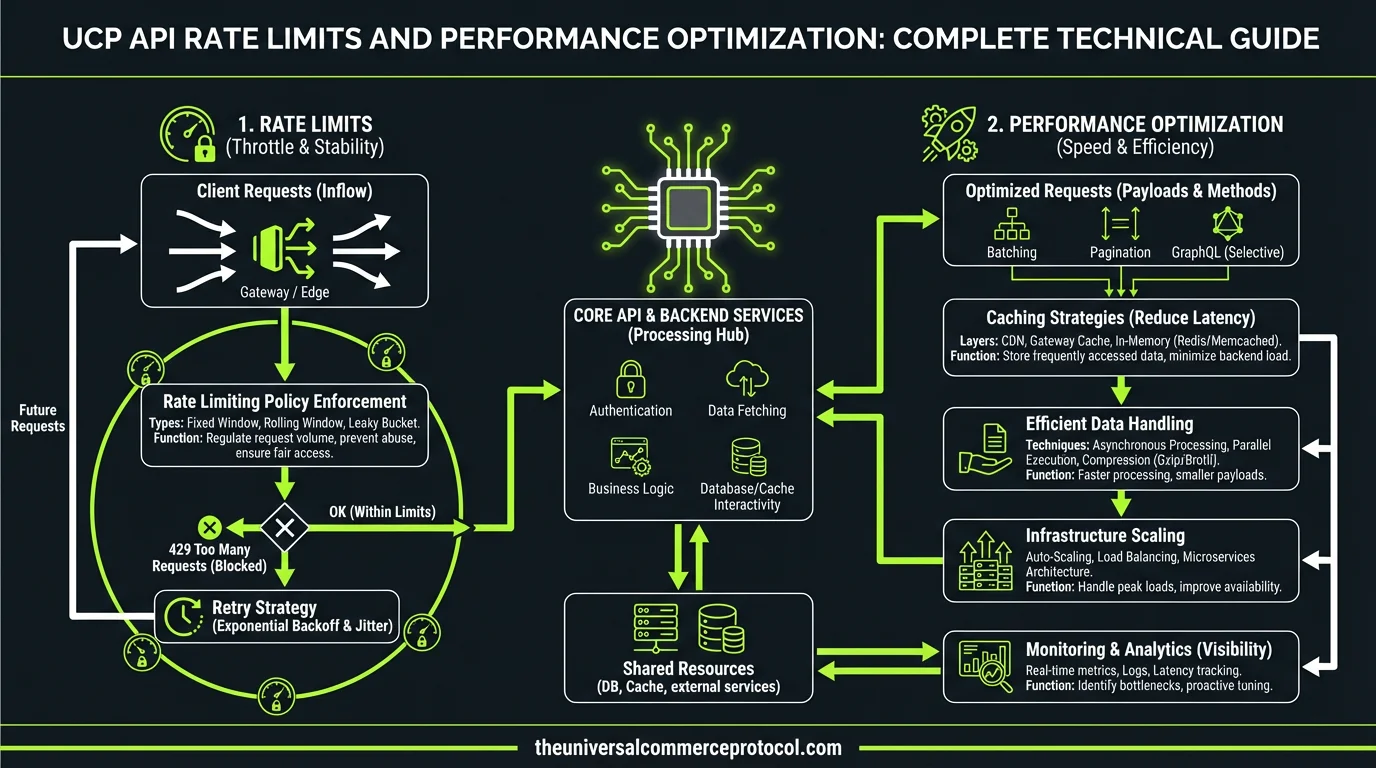
UCP API Rate Limits and Performance Optimization: Complete Technical Guide
The Universal Commerce Protocol (UCP) enables seamless omnichannel commerce experiences, but managing API performance effectively is critical for scaling operations. Understanding rate limits and implementing optimization strategies ensures your commerce platform maintains reliability, responsiveness, and cost efficiency. This comprehensive guide covers everything merchants, developers, and commerce professionals need to know about UCP API rate limits and performance optimization.
Understanding UCP API Rate Limits
Rate Limit Tiers and Allocation
UCP implements a tiered rate limiting system based on account level and subscription tier. Standard tier accounts typically receive 1,000 requests per minute (RPM), while enterprise accounts access 10,000 RPM or higher with custom arrangements. Rate limits apply per API endpoint, with different thresholds for read operations (generally higher) versus write operations (more restrictive).
Related articles: UCP Shipping Carrier Selection & Rate Optimization • UCP Security Best Practices for AI-Driven Commerce
The system allocates rate limit capacity across multiple dimensions: per-second limits prevent traffic spikes, per-minute buckets smooth sustained load, and per-hour quotas establish overall usage boundaries. Understanding this hierarchical structure helps you design applications that operate within constraints while maximizing throughput.
Rate Limit Headers and Response Codes
Every UCP API response includes critical rate limit headers that indicate your current consumption:
- X-RateLimit-Limit: Maximum requests allowed in the current window
- X-RateLimit-Remaining: Requests available before hitting the limit
- X-RateLimit-Reset: Unix timestamp when the limit resets
- X-RateLimit-Retry-After: Seconds to wait before retrying (when rate limited)
When you exceed rate limits, the API returns HTTP 429 (Too Many Requests) with a Retry-After header indicating backoff duration. Implementing proper header parsing and exponential backoff logic prevents cascading failures and unnecessary retry storms.
Performance Optimization Strategies
Request Batching and Consolidation
One of the most effective optimization techniques involves consolidating multiple API calls into batch operations. Instead of making individual requests for each product update, use UCP’s batch endpoints to process 50-100 items in a single API call. This approach reduces overhead by 90-95% compared to individual requests.
For example, when syncing inventory across channels, batch your updates into groups of 50 SKUs per request. A typical integration processing 5,000 product updates would require 5,000 individual calls without batching but only 100 calls with proper batching. This dramatically reduces rate limit consumption while improving overall system performance.
Caching Strategies
Implement multi-layer caching to minimize API calls entirely. Cache product catalogs, customer segments, and configuration data locally with appropriate TTLs (time-to-live). Most product information remains stable for hours; customer segments update less frequently than real-time order data.
Use Redis or Memcached for distributed caching across multiple servers. Set aggressive cache TTLs for reference data (24 hours), moderate TTLs for customer data (1 hour), and short TTLs for inventory and pricing (5-15 minutes). Implement cache invalidation webhooks so updates trigger immediate cache refreshes rather than waiting for TTL expiration.
Webhook Implementation for Real-Time Updates
Rather than polling the UCP API repeatedly to check for order status changes, configure webhooks to receive push notifications. Webhooks eliminate unnecessary API calls while providing real-time updates. A typical polling approach might make 10,000 status check calls daily; webhooks reduce this to only the calls needed for actual state changes.
Implement robust webhook handling with idempotency keys, retry logic, and dead-letter queues for failed deliveries. Store webhook events in a queue and process them asynchronously to prevent blocking your main request handler.
Advanced Optimization Techniques
Connection Pooling and HTTP/2
Establish persistent HTTP connections to UCP endpoints using connection pooling. Creating new TCP connections for each request adds 100-300ms of latency. Connection pooling reuses existing connections, reducing overhead by 70-80%. Configure your HTTP client library to maintain 10-50 persistent connections depending on your throughput requirements.
Ensure your integration uses HTTP/2, which multiplexes multiple requests over a single connection. HTTP/2 reduces latency by 30-50% compared to HTTP/1.1 for concurrent requests. Most modern HTTP client libraries support HTTP/2 automatically; verify your configuration enables it.
Request Prioritization and Queue Management
Implement intelligent request queuing that prioritizes high-impact operations. Order placement and payment processing should execute immediately, while non-urgent operations like analytics logging can queue with lower priority. This ensures critical transactions complete within rate limits even under high load.
Use token bucket algorithms to smooth request distribution. Rather than sending all requests immediately, distribute them evenly across the rate limit window. This prevents burst traffic that quickly exhausts limits and triggers 429 responses.
Pagination Optimization
When retrieving large datasets, implement efficient pagination strategies. Use cursor-based pagination instead of offset-based pagination; cursor-based pagination scales to millions of records while offset-based approaches degrade with large offsets. Request only the fields you need using sparse fieldsets to reduce response payload size by 50-70%.
Implement parallel pagination where appropriate—fetch multiple pages concurrently using separate API calls to different page ranges. This accelerates data retrieval while staying within per-request rate limits.
Monitoring and Observability
Rate Limit Tracking and Alerting
Implement comprehensive monitoring for rate limit consumption. Track your remaining quota percentage and alert when consumption exceeds 70% of your limit. This early warning system prevents unexpected rate limit errors during critical operations.
Log all API responses including rate limit headers, response times, and status codes. Analyze these logs to identify inefficient patterns—endpoints consuming disproportionate quota, times of peak usage, and opportunities for further optimization.
Performance Metrics and SLOs
Establish Service Level Objectives (SLOs) for API performance. Target 95th percentile response times under 500ms, 99th percentile under 1 second, and error rates below 0.1%. Monitor these metrics continuously and investigate deviations.
Track key performance indicators including requests per second, average response time, 95th/99th percentile latencies, error rates by endpoint, and rate limit hit frequency. Use these metrics to identify bottlenecks and prioritize optimization efforts.
Implementation Best Practices
Exponential Backoff and Retry Logic
Implement proper retry logic for rate-limited requests. Start with a 1-second backoff, then double on each retry (1s, 2s, 4s, 8s, 16s). Add jitter to prevent thundering herd problems where multiple clients retry simultaneously. Stop retrying after 5-6 attempts to prevent excessive delays.
Only retry idempotent operations (GET, DELETE) automatically. For state-changing operations (POST, PUT), require explicit retry logic or manual intervention to prevent duplicate transactions.
Testing and Load Simulation
Use UCP sandbox environments to test your integration under simulated load. Gradually increase request volume to identify your actual throughput limits and optimization opportunities. Test rate limit handling with tools that deliberately trigger 429 responses to verify your backoff logic functions correctly.
Conduct load testing with realistic traffic patterns—simulate peak hours, seasonal spikes, and concurrent user sessions. Identify bottlenecks before they impact production systems.
Documentation and Team Communication
Document your rate limit strategy, caching policies, and performance targets clearly. Ensure all team members understand rate limit constraints and optimization techniques. Create runbooks for common scenarios like handling unexpected rate limit errors during critical operations.
Common Optimization Mistakes to Avoid
Polling Instead of Webhooks: Polling wastes API quota on status checks that often return no changes. Webhooks eliminate this waste entirely.
Ignoring Cache Opportunities: Caching reference data reduces API calls by 70-80% with minimal complexity. Implement caching from day one.
Sequential Instead of Parallel Requests: When possible, execute independent API calls in parallel rather than sequentially. This reduces total execution time without increasing rate limit consumption per second.
Inadequate Error Handling: Poor error handling leads to retry storms that quickly exhaust rate limits. Implement proper exponential backoff and circuit breakers.
Insufficient Monitoring: Without visibility into rate limit consumption, you discover problems only after they impact customers. Monitor proactively.
Scaling Beyond Standard Rate Limits
Enterprise Rate Limit Increases
If your optimization efforts still leave you constrained by rate limits, contact UCP support about enterprise tier upgrades. Enterprise accounts receive 10x-100x higher rate limits with dedicated infrastructure. Provide usage metrics and growth projections to justify the upgrade.
Regional Endpoints and Load Distribution
UCP provides regional endpoints in multiple geographic areas. Distribute traffic across regions to increase aggregate throughput. A request to the US endpoint and a request to the EU endpoint count against separate rate limit buckets, effectively doubling your capacity.
FAQ
What happens when I exceed UCP API rate limits?
The API returns HTTP 429 (Too Many Requests) responses. The Retry-After header indicates how long to wait before retrying. Requests during this period continue to fail. Implement exponential backoff logic to handle rate limits gracefully. Monitor rate limit headers proactively to avoid hitting limits.
How can I reduce my API rate limit consumption?
Implement batching to consolidate multiple operations into single API calls, reducing consumption by 90-95%. Cache reference data locally to eliminate repeated requests. Use webhooks instead of polling for status updates. Optimize pagination with cursor-based approaches. These techniques typically reduce API calls by 70-80%.
Should I use individual API calls or batch operations?
Always use batch operations when available. Batch endpoints process 50-100 items per request compared to one item per request for individual calls. This reduces rate limit consumption and improves performance. Individual calls are appropriate only for real-time, single-item operations.
How do I monitor my rate limit consumption?
Parse rate limit headers in every API response: X-RateLimit-Limit, X-RateLimit-Remaining, and X-RateLimit-Reset. Log these values along with timestamps and endpoints. Analyze logs to identify consumption patterns and set alerts when remaining quota drops below 30% of your limit.
What’s the difference between per-second, per-minute, and per-hour rate limits?
Per-second limits prevent traffic spikes that could overwhelm servers. Per-minute limits smooth sustained load across the minute. Per-hour limits establish overall daily quota. All three apply simultaneously; you must stay within each bucket. Implement token bucket algorithms to distribute requests evenly across all time windows.
What are the standard UCP API rate limits for different account tiers?
UCP implements a tiered rate limiting system where Standard tier accounts typically receive 1,000 requests per minute (RPM), while Enterprise accounts access 10,000 RPM or higher with custom arrangements. Rate limits vary by API endpoint, with read operations generally having higher thresholds than write operations.
How does UCP allocate rate limit capacity?
UCP allocates rate limit capacity across multiple dimensions: per-second limits prevent traffic spikes, per-minute buckets smooth sustained load, and per-hour caps manage overall usage. This multi-dimensional approach ensures balanced API consumption and prevents any single traffic pattern from overwhelming the system.
What’s the difference between read and write operation rate limits in UCP?
Read operations in UCP generally have higher rate limits compared to write operations, which are more restrictive. This prioritization protects data integrity and system stability while allowing faster data retrieval for read-heavy workloads typical in commerce operations.
Why is performance optimization critical for UCP API management?
Performance optimization is essential for scaling omnichannel commerce operations while maintaining reliability, responsiveness, and cost efficiency. Proper optimization ensures your commerce platform can handle increased traffic without hitting rate limits and degrading user experience.
Can enterprises customize their UCP API rate limits?
Yes, Enterprise tier accounts have the flexibility to access 10,000 RPM or higher with custom arrangements. This allows large-scale operations to negotiate rate limits tailored to their specific commerce requirements and traffic patterns.
Frequently Asked Questions
What is the Universal Commerce Protocol (UCP)?
The Universal Commerce Protocol (UCP) is an open standard developed to enable AI agents to autonomously conduct commerce transactions across any platform.
How does UCP enable agentic commerce?
UCP provides standardized APIs and protocols so AI agents can discover products, negotiate terms, and complete purchases without human intervention, working across any compatible commerce platform.
Why should businesses implement UCP?
UCP adoption reduces integration costs, opens revenue channels to AI-driven buyers, and future-proofs commerce infrastructure as agentic purchasing becomes mainstream.
Leave a Reply