I knew what WebMCP was before I touched it. The spec was clear — websites expose tools, agents call them, no screenshot interpretation involved. What I didn’t know was how clean the implementation would actually be on a live WordPress site, or whether the agent would call the right tools from natural language without any hand-holding.
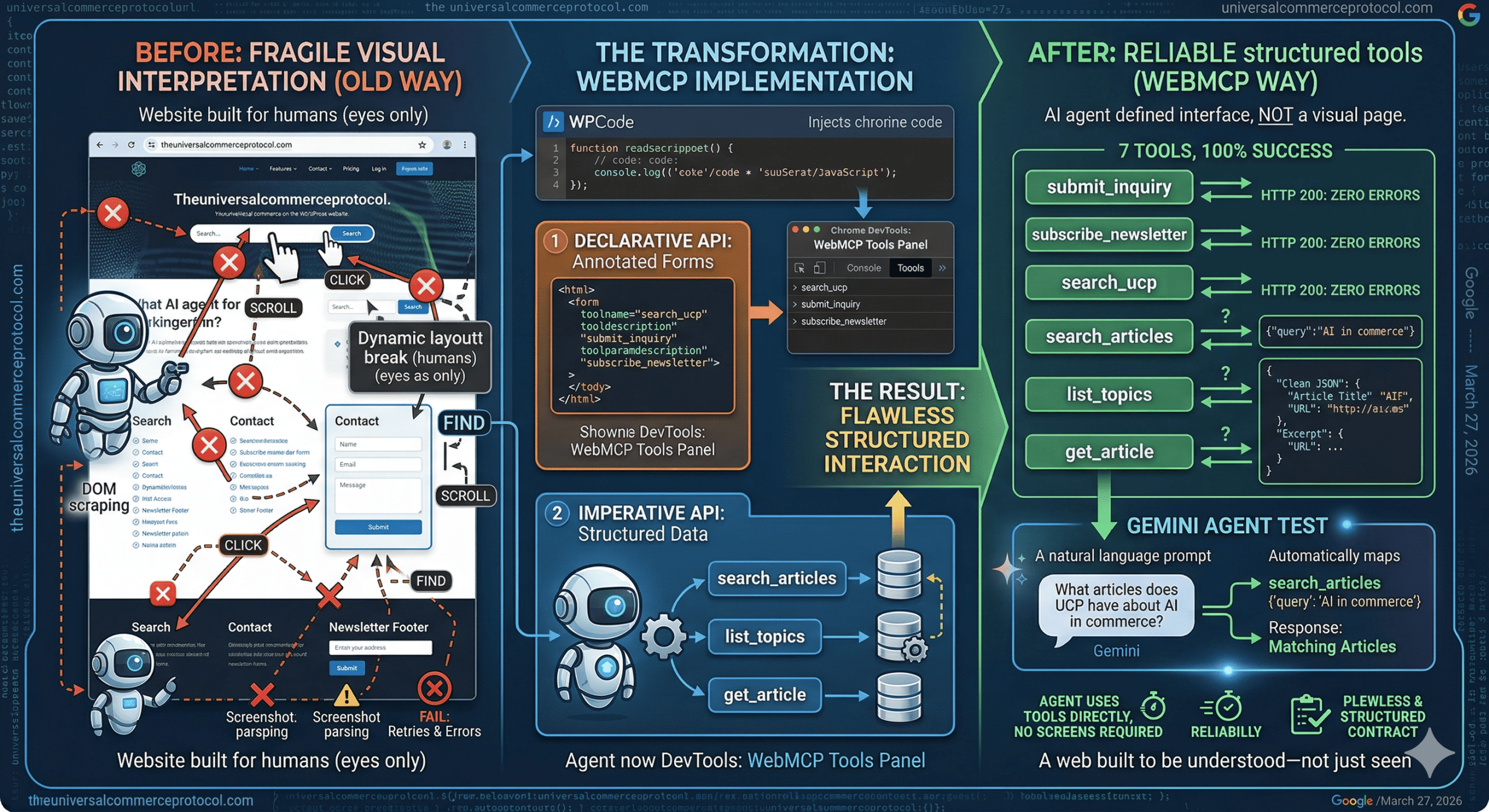
WebMCP, released by Google takes a different approach entirely. Instead of agents interpreting pages visually, websites expose structured tools that an agent can call directly. No screenshots. No DOM scraping. No guessing at layouts. I implemented and tested it on theuniversalcommerceprotocol.com across three phases — and the results were clean across the board.
What I Actually Built
The implementation covered three forms using the Declarative API — HTML attributes added directly to existing form elements via a JavaScript snippet injected through WPCode. Three tools ended up registered this way:
- search_ucp — the site’s search form, annotated with
toolname,tooldescription, andtoolparamdescriptionattributes - submit_inquiry — a contact form built specifically for this test
- subscribe_newsletter — a newsletter signup form in the footer
Once annotated, all three showed up immediately in the WebMCP Tools panel in DevTools. The agent could see them, understand their parameters, and call them — without ever rendering the page visually.
For the Imperative API phase, I registered three additional tools via navigator.modelContext.registerTool(), each wired to the WordPress REST API to return structured data:
- search_articles — accepts a query and category, returns article titles, URLs, and excerpts
- list_topics — returns site categories with article counts
- get_article — retrieves full article content by slug
Forms
The contact form was the most straightforward. The agent called submit_inquiry with the correct parameters and the form submitted instantly — no field hunting, no visual parsing, no retries. The newsletter signup was identical in simplicity: one tool call with an email address, one confirmation back. What would normally involve an agent scrolling to locate a footer form, identifying the input field, and hoping the submit button was labeled predictably — here it was a single function call.
Search
The search interaction is where the structured approach showed its real advantage. search_articles accepted a query and returned clean structured data — article titles, URLs, and excerpts — directly from the WordPress REST API. I ran it twice across different queries and got consistent results both times. list_topics returned site categories including “Agentic Commerce” with a count of 134. get_article pulled full article content for a specific slug without any layout interpretation involved.
No scraping. No hoping the HTML was consistent enough to parse. Just a direct call and a clean JSON response every time.
The Gemini Agent Test
This was the part that made everything concrete. I connected a Gemini API key to the WebMCP extension and submitted a natural language prompt: “What articles does UCP have about AI in commerce?”
Gemini automatically identified the right tool — search_articles — called it with {"query": "AI in commerce"}, and returned matching articles. No manual tool selection. No prompt engineering to get it to use the right function. It read the tool definitions, understood what was available, and made the correct call from plain English. HTTP 200. Zero errors.
The Old Way vs This
The traditional screenshot-based approach gives an agent a visual snapshot and asks it to figure out what to do — locate a button, identify a field, infer structure from layout. It works often enough to be useful, but breaks on dynamic pages, unconventional designs, and anything that doesn’t render predictably. Every interaction is essentially a best guess.
WebMCP replaces that guess with a contract. The website declares: here are the tools, here are the inputs, here is what I return. The agent doesn’t interpret anything — it calls the right tool with the right parameters. The difference in reliability is structural, not marginal.
What Actually Surprised Me
The silence. No console errors throughout the entire test. No retries. No failed element lookups. Every single tool — all seven of them — returned HTTP 200 on the first call. Across form submission, search, newsletter signup, and a live Gemini agent test, nothing broke.
What surprised me more was how little the agent needed to know about the page. It never rendered it. It never scrolled it. It just consumed a defined interface the same way you’d call an API endpoint, because that’s effectively what WebMCP is — an API layer that lives on a webpage.
Why This Matters for the Web
WebMCP is a signal of where web infrastructure needs to go as AI agents become a meaningful portion of site traffic. Websites today are built for human eyes — navigation, layout, visual hierarchy all assume a person is looking at the screen. That assumption is starting to crack.
A site that exposes structured tools alongside its human-facing interface works for both. It doesn’t require rebuilding anything — it requires adding a layer agents can use directly. The sites that do this early will be the ones agents can actually interact with reliably. The ones that don’t will rely on agents guessing, and guessing gets things wrong.
Where This Goes
There are real limitations right now. WebMCP only works in Chrome 146+ with the flag enabled. It requires a visible browser tab — no headless mode. Agents have to visit the page first since there’s no automatic discovery yet. The standard is early and will evolve.
But after running seven tools across three phases — declarative forms, imperative API tools, and a live AI agent test — and getting zero errors throughout, the direction is hard to argue with. Agents that interact through structured interfaces are faster, more reliable, and far less brittle than agents navigating visually.
The web that agents navigate by guessing is already starting to feel like the past. What comes next is a web built to be understood — not just seen.
Frequently Asked Questions
What is the Universal Commerce Protocol?
The Universal Commerce Protocol (UCP) is an open standard for AI agent commerce developed by Google and Shopify.
How does UCP enable agentic commerce?
UCP provides standardized APIs and protocols enabling AI agents to autonomously conduct commerce transactions.
Why implement UCP?
UCP reduces development costs, enables new revenue opportunities, and future-proofs your commerce infrastructure.
Leave a Reply