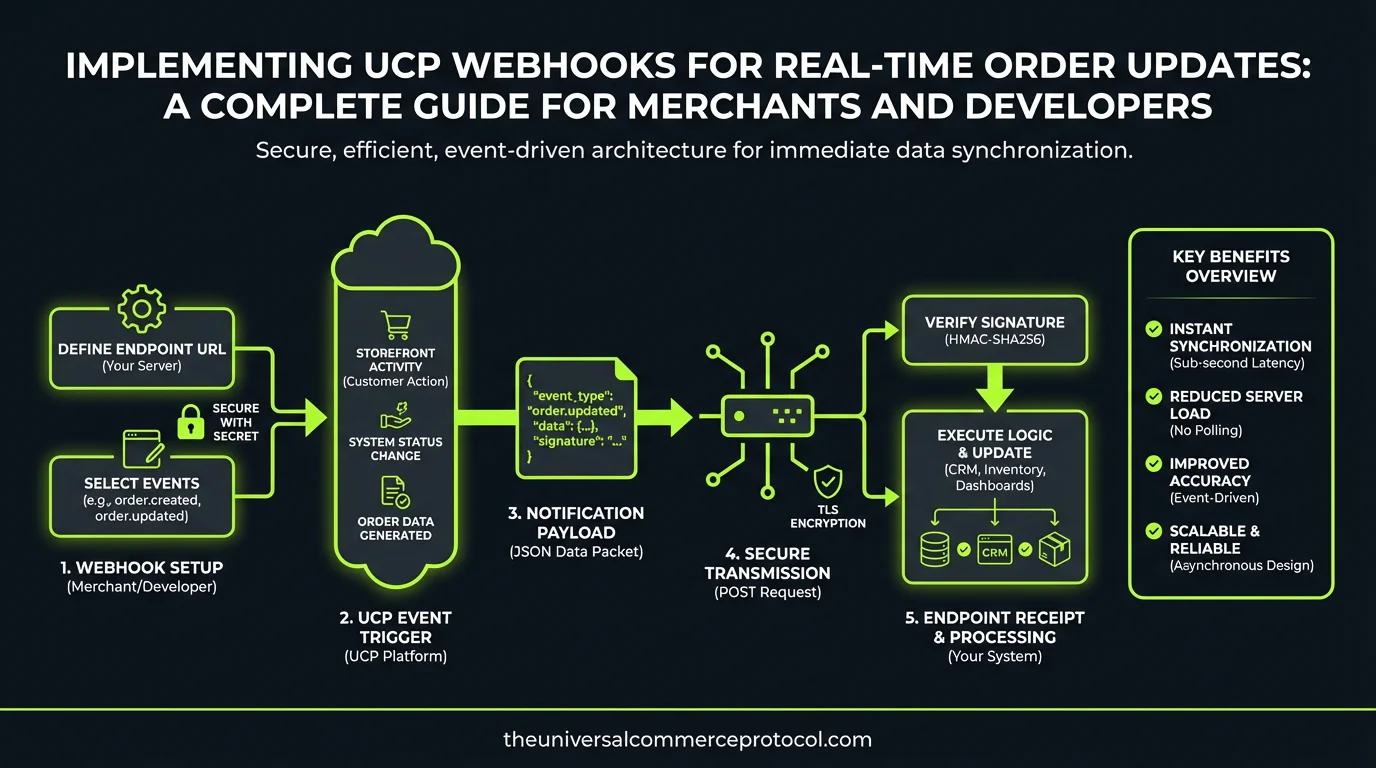
Implementing UCP Webhooks for Real-Time Order Updates: A Complete Guide for Merchants and Developers
The Universal Commerce Protocol (UCP) represents a fundamental shift in how commerce systems communicate and synchronize data. As merchants increasingly adopt agentic commerce and multi-channel selling strategies, the ability to receive real-time order updates becomes critical for operational efficiency, inventory management, and customer satisfaction. This guide walks you through implementing UCP webhooks to ensure your commerce infrastructure stays synchronized across all touchpoints.
Understanding UCP Webhooks in Modern Commerce
Webhooks are HTTP callbacks that allow applications to send real-time data to other systems when specific events occur. Within the UCP framework, webhooks serve as the nervous system of your commerce infrastructure, enabling instantaneous communication between order management systems, payment processors, fulfillment platforms, and customer communication tools.
Related articles: UCP Shipping Carrier Selection & Rate Optimization • UCP Security Best Practices for AI-Driven Commerce
Unlike traditional polling mechanisms that repeatedly check for updates at fixed intervals, webhooks push data immediately when events occur. This approach reduces latency, decreases server load, and ensures your systems remain synchronized with minimal delay. For merchants operating AI shopping agents or managing complex order flows, this real-time capability is essential.
Why Real-Time Order Updates Matter
Real-time order updates directly impact several critical business functions. When a customer places an order through an AI shopping agent, inventory systems must immediately reflect the purchase to prevent overselling. Payment processing status changes need instant notification to trigger fulfillment workflows. Shipping updates must reach customers promptly to reduce support inquiries. Without real-time webhooks, merchants face inventory discrepancies, delayed fulfillment, and poor customer experiences.
UCP Webhook Architecture and Event Types
Core Event Categories
UCP webhooks organize events into logical categories that correspond to key commerce operations. Understanding these categories helps you implement the specific listeners your business requires.
Order Events: These fire when orders are created, updated, cancelled, or reach specific lifecycle milestones. Common order events include order.created, order.confirmed, order.payment_received, order.cancelled, and order.refunded. Each event includes comprehensive order data including line items, customer information, payment details, and fulfillment status.
Payment Events: Payment webhooks trigger when transactions are initiated, authorized, captured, or fail. Events like payment.authorized, payment.captured, payment.failed, and payment.refunded allow you to synchronize financial records and trigger appropriate business logic. This is particularly important for merchants using multiple payment processors or offering flexible payment options.
Fulfillment Events: These webhooks notify you of shipping, delivery, and return status changes. Events include fulfillment.created, fulfillment.shipped, fulfillment.in_transit, fulfillment.delivered, and fulfillment.exception. Real-time fulfillment updates enable accurate customer communication and proactive issue resolution.
Inventory Events: When inventory levels change significantly or stock runs out, inventory events fire to alert connected systems. inventory.updated, inventory.low_stock, and inventory.out_of_stock events help prevent overselling and trigger replenishment workflows.
Customer Events: Customer-related webhooks track account creation, profile updates, and preference changes. These events enable personalization engines and customer data platforms to stay current with customer information.
Event Payload Structure
Each UCP webhook event follows a standardized payload structure for consistency and reliability. The payload includes a unique event ID, timestamp, event type, and the relevant resource data. For example, an order.created event includes the complete order object with all associated metadata. This standardization simplifies parsing and processing across your development team.
Setting Up Your Webhook Infrastructure
Registering Webhook Endpoints
To receive webhooks, you must first register endpoint URLs with your UCP provider or through your commerce platform’s API. These endpoints are publicly accessible HTTPS URLs where your application listens for incoming webhook events. Best practice dictates using dedicated, versioned endpoints like https://api.yourstore.com/webhooks/v1/ucp/orders to allow for future API evolution without disrupting production services.
When registering endpoints, specify which events you want to receive. Rather than subscribing to all possible events, implement selective subscriptions based on your actual business needs. This reduces unnecessary network traffic and processing overhead. Most platforms allow you to configure webhooks through a dashboard or programmatically via API.
Authentication and Security
Every webhook request must be authenticated to ensure it genuinely comes from your UCP provider and hasn’t been tampered with. UCP implements webhook authentication through cryptographic signatures included in request headers. Typically, your provider signs each webhook payload using a shared secret key, generating an HMAC signature that you can verify.
Upon receiving a webhook, extract the signature from the request header (usually X-UCP-Signature or similar), reconstruct the signature using your secret key and the raw request body, and compare the values. If they match, the webhook is authentic. This verification prevents malicious actors from injecting fake webhook events into your system.
Always use HTTPS for webhook endpoints and rotate your secret keys periodically. Store secrets securely in environment variables or secrets management systems, never hardcoding them in your application code. Implement rate limiting on your webhook endpoints to protect against denial-of-service attacks.
Handling Webhook Delivery Reliability
Network failures happen. UCP providers implement automatic retry logic for failed webhook deliveries, typically retrying with exponential backoff over several hours. However, your application must be designed to handle duplicate webhook events gracefully.
Implement idempotency by storing processed webhook event IDs in a database and checking against this store before processing new events. If you receive a duplicate event ID, skip processing and return success. This ensures that network retries or accidental redeliveries don’t cause duplicate orders, double charges, or inventory discrepancies.
Design your webhook handlers to be idempotent at the business logic level as well. For example, if an order.confirmed webhook updates order status, ensure the update operation safely handles being called multiple times without side effects.
Implementing Webhook Handlers
Basic Handler Structure
A robust webhook handler follows a consistent pattern: receive the request, verify the signature, parse the payload, process the business logic, and return a success response. Here’s the conceptual flow:
First, immediately return a 200 OK response to acknowledge receipt. This prevents the provider from retrying the webhook. Then asynchronously process the event in a background job or queue. This separation ensures your webhook endpoint remains responsive and prevents timeouts.
Second, verify the webhook signature before processing any data. Reject unsigned or incorrectly signed webhooks with a 401 Unauthorized response.
Third, check your idempotency store for the event ID. If already processed, return success without re-processing.
Fourth, parse the webhook payload and extract relevant data. Transform the UCP event data into your internal data models.
Fifth, execute your business logic: update databases, trigger workflows, send notifications, or call downstream APIs.
Finally, log the outcome for debugging and monitoring.
Event-Specific Processing Logic
Different event types require different handling. An order.created event might trigger inventory reservation and customer notification. An order.payment_received event triggers fulfillment preparation. An order.cancelled event releases reserved inventory and initiates refund processing.
Organize your code with event-specific handlers that encapsulate the business logic for each event type. Use a router or switch statement to dispatch incoming events to appropriate handlers. This structure keeps your code maintainable as you add support for additional event types.
Error Handling and Logging
Webhook processing can fail for legitimate reasons: database connection issues, downstream API failures, or data validation errors. Implement comprehensive error handling that distinguishes between recoverable and permanent failures.
For recoverable errors (temporary database unavailability), return a non-2xx status code to signal the provider to retry. For permanent errors (invalid data that will never be processable), log the error, alert your team, and return 200 to prevent infinite retries.
Maintain detailed logs of all webhook processing, including timestamps, event IDs, outcomes, and any errors. These logs are invaluable for debugging issues and auditing commerce operations. Consider integrating with centralized logging platforms for better visibility across your infrastructure.
Testing and Monitoring Webhooks
Development and Testing Strategies
Most UCP providers offer sandbox environments where you can test webhook functionality without affecting production data. Use sandbox credentials to register test endpoints and trigger test events through the provider’s dashboard or API.
For local development, use webhook forwarding tools like ngrok to expose your local development server to the internet, allowing the provider to deliver webhooks to your machine. This enables rapid iteration and debugging.
Implement comprehensive test coverage for your webhook handlers, including tests for signature verification, idempotency, error handling, and business logic. Use mocked webhook payloads to test various event types and edge cases.
Monitoring and Alerting
In production, monitor webhook endpoint health continuously. Track metrics like delivery success rate, processing latency, and error frequency. Set up alerts for concerning patterns: sudden increases in failures, processing timeouts, or signature verification failures.
Implement health check endpoints that verify your webhook infrastructure is functioning correctly. These checks should validate that your idempotency store is accessible, downstream APIs are reachable, and database connections are healthy.
Monitor the end-to-end latency from event occurrence to completion of your business logic processing. Real-time updates are only valuable if they’re truly real-time. Identify and address bottlenecks that cause delays.
Advanced Webhook Patterns
Webhook Aggregation and Batching
For high-volume merchants receiving hundreds of webhooks per minute, processing each individually can strain resources. Implement aggregation patterns where you collect incoming webhooks and process them in batches at regular intervals. This reduces database transactions and API calls while maintaining acceptable latency.
Webhook Filtering and Routing
As your commerce infrastructure grows, different services need different events. Implement a webhook dispatcher that receives all events and routes them to appropriate downstream services based on event type and merchant configuration. This centralized approach simplifies management and enables dynamic subscription changes without modifying individual services.
Dead Letter Queues
When webhook processing fails permanently, implement dead letter queue patterns where failed events are stored separately for manual inspection and replay. This ensures no data is lost and allows your team to investigate and fix issues before replaying events into your system.
Best Practices for Production Deployments
Deploy webhook handlers across multiple instances behind a load balancer to ensure availability and handle traffic spikes. Use container orchestration platforms like Kubernetes to manage scaling automatically.
Implement circuit breakers when calling downstream services from webhook handlers. If a payment processing API becomes unavailable, fail fast and queue the event for retry rather than timing out.
Version your webhook API from the start. When you need to add new fields or change event structures, use versioned endpoints to maintain backward compatibility with older integrations.
Maintain comprehensive documentation of your webhook implementation, including payload examples for each event type, error codes, and troubleshooting guides. This documentation accelerates onboarding for new team members and reduces support burden.
Frequently Asked Questions
Q: How long should webhook processing take?
A: Webhook endpoints should acknowledge receipt within 5 seconds by returning a 200 status code. Asynchronous processing of business logic can take longer, but critical operations like payment confirmation should complete within seconds to ensure real-time responsiveness. Monitor your average processing latency and investigate any increases.
Q: What happens if my webhook endpoint is down?
A: UCP providers implement automatic retry logic, typically retrying for 24-48 hours with exponential backoff. However, you may miss some events if your endpoint is down for extended periods. Implement monitoring to alert you immediately if your webhook endpoint becomes unreachable, and ensure your infrastructure has redundancy and failover capabilities.
Q: How do I handle webhook events that arrive out of order?
A: While UCP attempts to deliver events in order, network conditions can cause reordering. Design your handlers to be resilient to out-of-order events. Check timestamps and existing state before applying updates. For critical sequences, implement state machines that validate transitions before allowing state changes.
Q: Can I replay webhook events?
A: Most UCP providers offer webhook replay functionality through their dashboard or API, allowing you to request redelivery of specific events. This is useful after fixing bugs or recovering from outages. Always test replay scenarios to ensure your idempotency logic works correctly.
Q: How do I scale webhook processing for high-volume merchants?
A: Implement asynchronous processing using message queues (RabbitMQ, Kafka, SQS) to decouple webhook receipt from business logic processing. Acknowledge webhooks immediately, then process events asynchronously with multiple workers. Implement batching for operations like inventory updates. Use caching to reduce database load for frequently accessed data.
What are UCP webhooks and how do they work?
UCP webhooks are HTTP callbacks that enable real-time data communication within the Universal Commerce Protocol framework. When specific events occur (like order updates), webhooks automatically push data to connected systems rather than requiring those systems to constantly check for updates. This allows your commerce infrastructure to stay synchronized across all touchpoints instantly.
Why should merchants implement UCP webhooks instead of traditional polling?
UCP webhooks offer significant advantages over traditional polling mechanisms. Unlike polling, which repeatedly checks for updates at fixed intervals, webhooks push data immediately when events occur. This approach reduces latency, decreases server load, improves operational efficiency, enhances inventory management, and ultimately increases customer satisfaction through faster order processing.
What systems can be integrated with UCP webhooks?
UCP webhooks act as the nervous system of your commerce infrastructure, enabling communication between multiple critical systems including order management systems, payment processors, fulfillment platforms, and customer communication tools. This ensures all your commerce touchpoints stay synchronized in real-time.
How do UCP webhooks support multi-channel selling strategies?
As merchants adopt agentic commerce and multi-channel selling, UCP webhooks become critical for maintaining synchronization across all sales channels. Real-time order updates ensure consistent inventory data, accurate order fulfillment, and seamless customer experiences whether orders come from your website, marketplace, social commerce, or other channels.
What are the key benefits of real-time order updates for merchants?
Real-time order updates through UCP webhooks provide merchants with operational efficiency, improved inventory management, reduced latency in order processing, decreased server resource consumption compared to polling, and enhanced customer satisfaction through faster order acknowledgment and fulfillment processes.
Leave a Reply