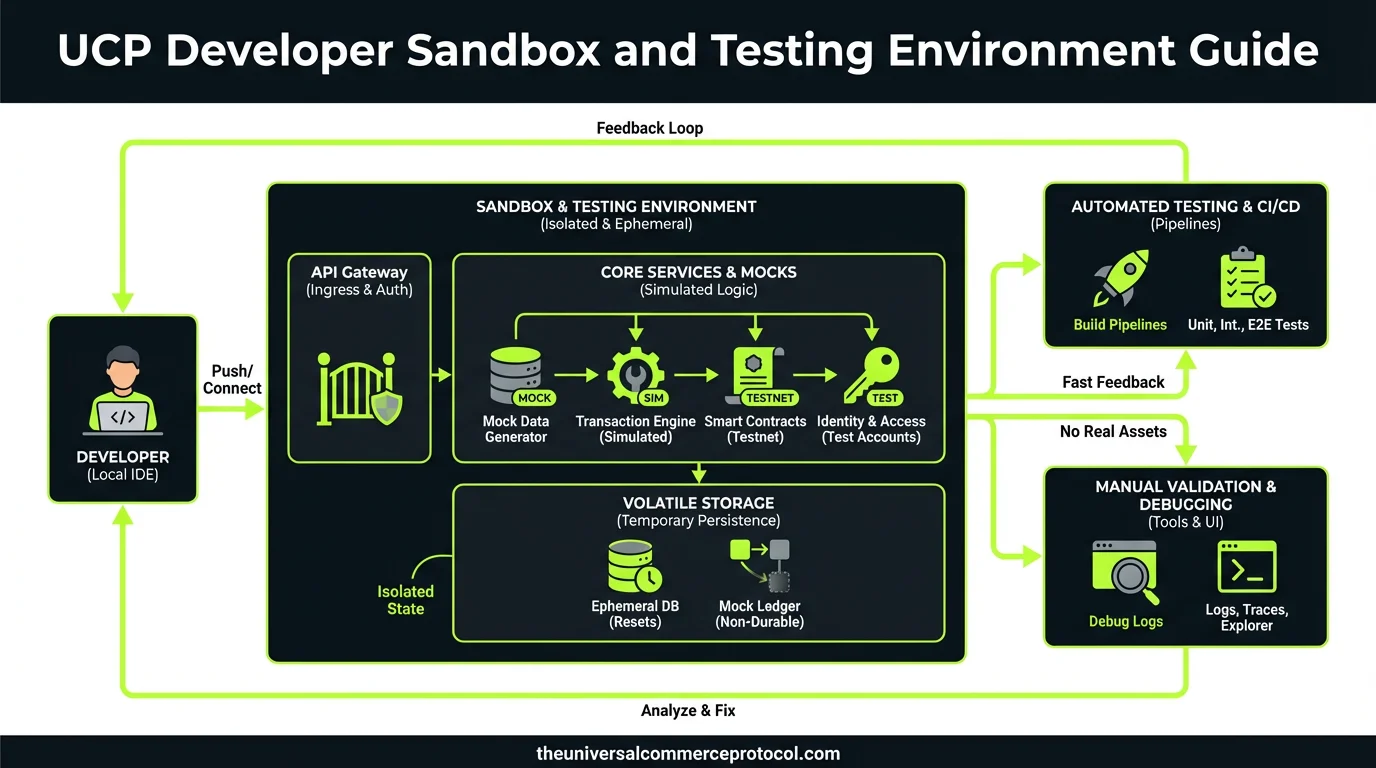
UCP Developer Sandbox and Testing Environment Guide
The Universal Commerce Protocol (UCP) developer sandbox is the critical foundation for building, testing, and validating commerce integrations before deploying to production environments. This comprehensive guide walks merchants, developers, and commerce professionals through every aspect of the UCP sandbox ecosystem, from initial setup through advanced testing scenarios.
Understanding the UCP Developer Sandbox Architecture
The UCP sandbox provides a complete, isolated replica of the production commerce environment. Unlike simplified testing frameworks, the UCP sandbox maintains feature parity with live systems, allowing developers to test real-world scenarios without affecting actual transactions or customer data.
Related articles: UCP Shipping Carrier Selection & Rate Optimization • UCP Security Best Practices for AI-Driven Commerce
Core Sandbox Components
The UCP sandbox consists of several interconnected systems:
- Mock Payment Processors: Simulate all payment methods including credit cards, digital wallets, and alternative payment systems without processing real transactions
- Test Merchant Accounts: Dedicated sandbox accounts with full feature access, separate from production credentials
- Simulated Fulfillment Systems: Replicate inventory management, shipping carrier integration, and order fulfillment workflows
- Webhook Testing Infrastructure: Capture and replay webhook events for validation of real-time notification systems
- Rate Limiting Simulation: Test application behavior under various API throttling scenarios
- Error Injection Tools: Deliberately trigger failures to validate error handling and recovery mechanisms
Each component operates independently but integrates seamlessly, allowing developers to test individual features or complete end-to-end commerce flows.
Setting Up Your UCP Sandbox Environment
Prerequisites and Account Configuration
Before beginning sandbox development, ensure you have:
- Active UCP developer account with sandbox access enabled
- API credentials (sandbox API keys separate from production keys)
- Webhook endpoint URL for receiving test events
- Development environment with appropriate SDKs installed
- Test merchant account provisioned in the sandbox
UCP sandbox accounts automatically provision test credentials upon account creation. These credentials use the same authentication mechanisms as production but route to isolated sandbox systems. Never use production credentials in development environments, and never commit sandbox keys to version control systems.
Sandbox Credentials and API Key Management
The UCP sandbox provides two types of API keys: publishable keys for client-side operations and secret keys for server-side requests. Publishable keys can be safely embedded in frontend code, while secret keys must remain protected on backend servers.
Regenerate sandbox keys periodically and immediately if compromised. The sandbox environment allows unlimited key regeneration without affecting other sandbox resources. Implement key rotation policies in your development workflow to maintain security best practices even in non-production environments.
Testing Payment Processing in the Sandbox
Test Payment Methods and Card Numbers
The UCP sandbox provides specific test card numbers that trigger predictable outcomes, enabling comprehensive payment testing:
- Successful Transaction: 4242 4242 4242 4242 (Visa)
- Declined Transaction: 4000 0000 0000 0002 (Visa)
- Requires Authentication: 4000 0025 0000 3155 (3D Secure)
- Insufficient Funds: 4000 0000 0000 9995
- Expired Card: Use any card with expiration date in the past
- Invalid CVC: Use any three-digit code with card 4000 0000 0000 0069
All test cards accept any future expiration date and any three-digit CVC code unless specifically testing CVC validation. The sandbox accepts test amounts in any currency supported by your merchant account.
Testing Payment Scenarios and Edge Cases
Beyond basic card testing, the sandbox enables validation of complex payment scenarios:
Currency Conversion: Test multi-currency transactions by specifying different currencies in payment requests. The sandbox applies realistic exchange rates and conversion fees, allowing you to validate pricing logic across markets.
Partial Captures: Create payment intents for larger amounts, then capture partial amounts to test split payment scenarios common in subscription or installment models.
Refunds and Reversals: Process full and partial refunds to validate your refund workflow, reconciliation logic, and customer communication systems.
Recurring Payments: Set up recurring payment profiles with various frequencies and test subscription lifecycle events including upgrades, downgrades, and cancellations.
3D Secure Authentication: Test two-factor authentication flows using the dedicated 3D Secure test card. The sandbox presents a simulated authentication screen to validate your frontend handling of authentication challenges.
Order and Fulfillment Testing
Creating Test Orders with Varied Scenarios
The sandbox order creation API accepts the same parameters as production, enabling realistic order testing. Create orders with:
- Single and multiple line items
- Digital and physical products
- Various shipping addresses including international destinations
- Different customer segments and loyalty statuses
- Promotional codes and discount scenarios
Each test order receives a unique order ID following production naming conventions, allowing your system to process sandbox orders identically to production orders.
Simulating Fulfillment Workflows
The sandbox provides fulfillment simulation tools that replicate real-world fulfillment timelines. After creating an order, use the fulfillment API to advance orders through their lifecycle:
- Order Pending: Initial state after successful payment
- Picking: Items selected from inventory
- Packing: Items prepared for shipment
- Shipped: Order handed to carrier with tracking number
- In Transit: Simulated delivery progress
- Delivered: Final delivery confirmation
Advance orders through these states manually using the sandbox fulfillment API, or configure automated progression with customizable delays. This allows testing of customer notification systems, inventory updates, and post-fulfillment workflows without waiting for real delivery times.
Testing Shipping and Carrier Integration
The sandbox includes mock shipping carrier APIs that simulate real carrier behavior. When requesting shipping rates for test orders, the sandbox returns realistic rate options based on destination, weight, and service level.
Test label generation, tracking number assignment, and carrier-specific requirements without incurring real shipping costs. The sandbox tracking numbers function in your system identically to production tracking numbers, enabling full validation of tracking and delivery notification workflows.
Webhook Testing and Event Validation
Webhook Endpoint Configuration
Configure your webhook endpoint URL in the sandbox dashboard to receive test events. The sandbox sends webhooks to your endpoint using identical payloads and delivery mechanisms as production, including retry logic and signature verification.
Implement webhook signature verification in your test environment using sandbox webhook secrets. The sandbox signs all webhook events with your sandbox secret key, allowing you to validate webhook authenticity and integrity.
Testing Event Scenarios and Replay
The sandbox webhook dashboard displays all events sent to your endpoint, including payload content, delivery status, and retry attempts. Replay specific events to test error handling and recovery workflows without recreating the triggering transaction.
Test webhook scenarios including:
- Payment success and failure events
- Order state transitions
- Fulfillment updates
- Refund processing
- Customer account changes
- Webhook delivery failures and retries
Configure your test endpoint to simulate failure conditions including timeouts, HTTP errors, and malformed responses. Validate that your webhook handler gracefully manages failures and implements appropriate retry logic.
Advanced Testing Strategies
Load and Performance Testing
The sandbox supports load testing without restrictions. Generate high-volume transaction requests to validate your system’s performance characteristics, identify bottlenecks, and confirm behavior under peak load conditions.
The sandbox implements realistic rate limiting matching production limits, allowing you to test rate limit handling and implement appropriate backoff strategies. Exceeding rate limits triggers standard HTTP 429 responses with retry-after headers.
Error Handling and Resilience Testing
Use the sandbox error injection tools to deliberately trigger failures and validate your error handling:
- Network timeouts and connection failures
- Malformed API responses
- Authentication failures
- Resource not found errors
- Server-side errors and service degradation
Verify that your application implements appropriate retry logic, exponential backoff, and graceful degradation when sandbox services return errors.
Data Consistency and Reconciliation Testing
Test your reconciliation processes using the sandbox reporting APIs. Generate test transaction reports and validate that your reconciliation logic correctly matches API responses against your internal records.
Create scenarios with discrepancies between expected and actual data to ensure your reconciliation system identifies and flags inconsistencies appropriately.
Best Practices for Sandbox Development
Environment Separation and Configuration Management
Maintain clear separation between sandbox and production environments. Use environment-specific configuration files that specify API endpoints, credentials, and feature flags. Implement configuration validation to prevent accidentally using production credentials in development.
Document all sandbox-specific behaviors and differences from production to ensure developers understand testing limitations and requirements.
Test Data Management
Create comprehensive test data sets covering all customer segments, product types, and transaction scenarios your system supports. Document test data creation procedures to ensure consistency across development team members.
Periodically reset sandbox test data to maintain clean testing environments and prevent accumulation of stale test records.
Documentation and Logging
Enable verbose logging in your sandbox integration to capture detailed API interactions, webhook events, and system state changes. Review logs systematically to identify integration issues and validate expected behavior.
Document all test scenarios, expected outcomes, and actual results. Maintain test case documentation to support regression testing and onboarding of new team members.
Transitioning from Sandbox to Production
Pre-Production Validation Checklist
Before deploying to production, validate:
- All payment scenarios tested and working correctly
- Webhook delivery and event processing functioning properly
- Error handling and recovery mechanisms validated
- Performance and load testing completed successfully
- Data reconciliation processes verified
- Security and credential management implemented correctly
- Monitoring and alerting systems configured
Production Credentials and Configuration
Obtain production API credentials from your UCP account manager. Production credentials follow identical authentication patterns to sandbox credentials but route to production systems with real transaction processing.
Update your application configuration to use production credentials, update webhook endpoints to production URLs, and implement enhanced monitoring for production traffic.
FAQ: UCP Developer Sandbox and Testing
Can I use sandbox data in production?
No. Sandbox and production systems are completely isolated. Test transactions created in the sandbox do not appear in production, and production credentials will not work with sandbox systems. You must recreate any necessary data in production using production APIs and credentials.
How long does sandbox data persist?
Sandbox data persists indefinitely unless explicitly deleted. However, UCP may periodically reset sandbox environments for maintenance. Critical test data should be documented in your test case documentation rather than relying on persistent sandbox records.
Are there limits on sandbox API requests?
Sandbox environments implement the same rate limiting as production to accurately simulate production behavior. However, sandbox rate limits are typically higher to accommodate load testing. Contact your UCP support team to request increased sandbox rate limits for performance testing scenarios.
Can I test webhook failures in the sandbox?
Yes. Configure your sandbox webhook endpoint to return HTTP errors, timeouts, or malformed responses. The sandbox retries failed webhook deliveries using the same retry logic as production, allowing you to validate your webhook error handling.
What happens if I accidentally use production credentials in sandbox code?
Production credentials will not work with sandbox systems. API requests using production credentials against sandbox endpoints will fail with authentication errors. Always verify you’re using sandbox credentials in development environments and implement configuration validation to prevent credential misuse.
What is the UCP Developer Sandbox?
The UCP (Universal Commerce Protocol) developer sandbox is a complete, isolated replica of the production commerce environment that provides feature parity with live systems. It allows developers to test real-world scenarios, build integrations, and validate commerce solutions without affecting actual transactions or customer data.
What can I test in the UCP Sandbox?
The UCP sandbox allows you to test various components including mock payment processors (credit cards, digital wallets, alternative payment systems), test merchant accounts with full feature access, and other core sandbox systems. You can simulate real-world commerce scenarios without processing actual transactions.
How does the UCP Sandbox differ from other testing frameworks?
Unlike simplified testing frameworks, the UCP sandbox maintains complete feature parity with production systems. This means you get an accurate representation of how your integration will perform in the live environment, rather than a limited or simplified testing experience.
Do transactions in the UCP Sandbox affect real customer data?
No. The UCP sandbox is completely isolated from production environments. All testing, transactions, and data processed in the sandbox are separate from actual customer data and live commerce operations, making it safe for comprehensive testing.
Who should use the UCP Developer Sandbox?
Merchants, developers, and commerce professionals should use the UCP sandbox to build, test, and validate commerce integrations before deploying to production environments.
Leave a Reply