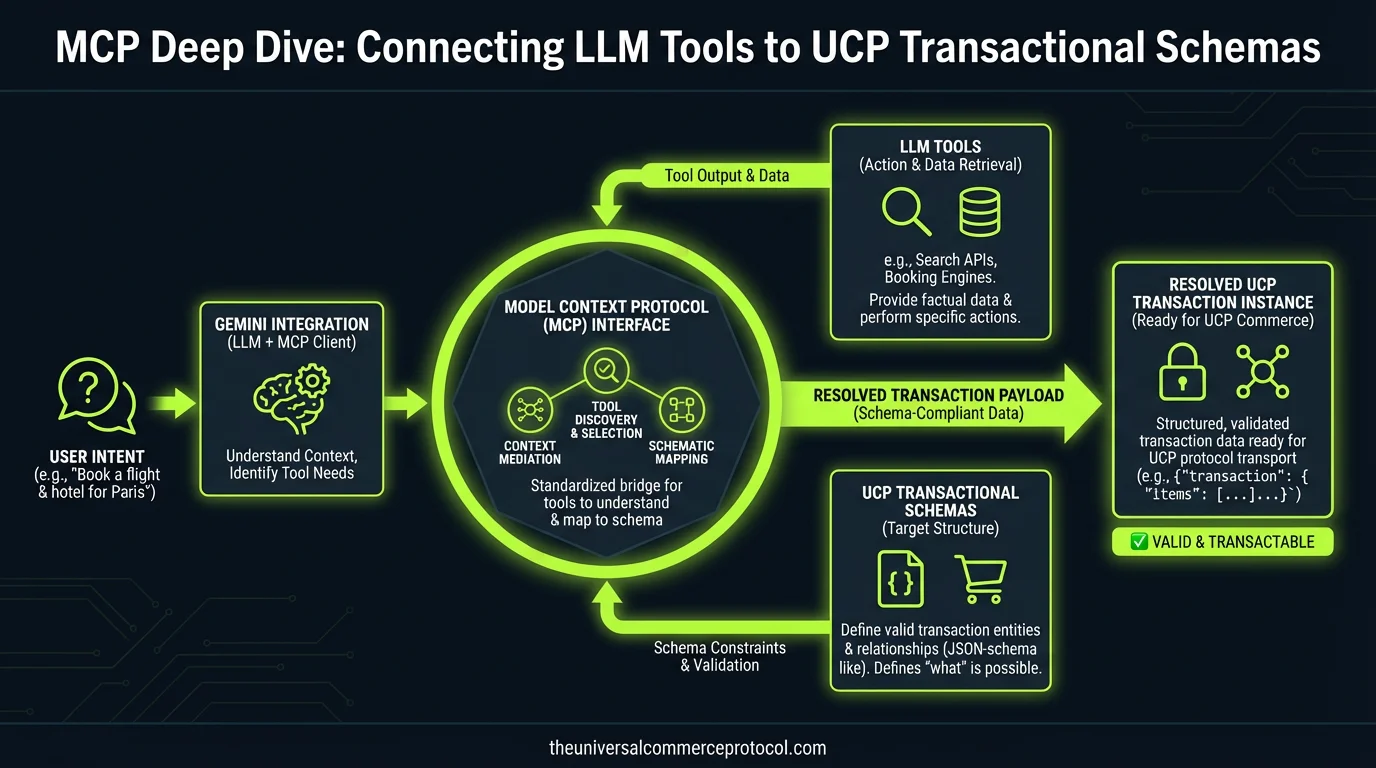
The Architecture of Agency
The transition from browser-based commerce to agentic commerce necessitates a paradigm shift in how digital systems communicate. Traditional RESTful APIs, while robust for deterministic front-end applications, often fail to provide the semantic density and discovery mechanisms required for Large Language Models (LLMs) to operate autonomously. Enter the Model Context Protocol (MCP), a standardized bridge designed to connect AI models like Gemini directly to live data and transactional capabilities. Within the Universal Commerce Protocol (UCP) framework, MCP acts as the transport layer that allows an agent to move from ‘searching’ to ‘transacting’ without human intervention in the middle of the stack.
In a UCP-enabled environment, the merchant hosts a server that exposes transactional schemas. However, the model requires a way to dynamically discover these capabilities. By implementing an MCP server that wraps UCP endpoints, developers create a self-describing interface. When a user asks a Gemini-powered agent to ‘Buy the latest Pixel Buds Pro 2 using my Google Pay,’ the agent doesn’t just parse text; it queries the MCP server to find the SubmitOrder tool, validates the required parameters against the UCP schema, and executes the call using JSON-RPC 2.0.
Resources vs Tools in MCP
Understanding the distinction between Resources and Tools is critical for developers building UCP integrations. In the MCP specification, these two primitives serve distinct roles in the agentic loop.
1. Resources: The Contextual Foundation
Resources in MCP represent the ‘read-only’ state of the merchant’s world. For a UCP implementation, resources typically map to the merchant’s catalog and current session state. Examples include:
- Product Catalog: Synced via Google Merchant Center, providing the agent with real-time availability and technical specifications.
- User Identity Context: Securely shared identity signals that tell the agent the user’s preferred shipping address and eligibility for loyalty discounts.
- UCP Discovery Document: The
/.well-known/ucpconfiguration that defines the merchant’s supported payment methods (e.g., Google Pay) and checkout paths.
2. Tools: The Transactional Engine
Tools are executable functions that allow the model to change the state of the world. In the UCP context, tools are the ‘verbs’ of commerce. These are defined with strict JSON schemas so the LLM knows exactly which arguments are required.
| UCP Tool Name | Function | Required Parameters |
|---|---|---|
GetQuote |
Calculates final price including tax/shipping. | product_id, shipping_address, quantity |
InitializeCheckout |
Creates a secure checkout session. | cart_items, customer_id |
SubmitOrder |
Finalizes the transaction via Google Pay. | payment_token, quote_id |
By segregating data (Resources) from actions (Tools), MCP prevents the model from hallucinating transactional capabilities and ensures that execution only happens when the model has sufficient context.
Implementing a UCP MCP Server
To implement an MCP server that adheres to UCP standards, developers should follow a tiered approach, starting with the transport layer and moving to the semantic mapping of Google ecosystem tools.
Step 1: Transport and Handshake
The MCP server typically communicates over Stdio or HTTP with the model. Upon initialization, the server sends a list_tools response. For a UCP merchant, this list should be dynamically generated based on the merchant’s capabilities. If a merchant supports Native Checkout, the SubmitOrder tool is exposed. If they only support Embedded Checkout, the tool might instead return a secure URL for the agent to present to the user.
Step 2: Integrating Google Merchant Center
The catalog is the lifeblood of commerce. Instead of hardcoding product lists, the MCP server should act as a proxy for the Google Merchant Center Content API. When the model requests the ProductSearch tool, the MCP server queries the merchant’s supplemental feeds to ensure prices and inventory levels are accurate to the millisecond.
Step 3: Managing the Google Pay Payload
Security is paramount when handling payment data. The MCP server must never expose raw credit card data to the LLM. Instead, the PreparePayment tool interacts with the Google Pay API to generate a one-time payment token. The LLM only sees a reference to this token, which it then passes to the UCP SubmitOrder endpoint. This preserves the Merchant of Record integrity while allowing the agent to manage the workflow.
Latency Reduction via Standardized Context
One of the primary challenges in agentic commerce is the ‘token latency’—the time it takes for a model to process information and respond. In a commerce transaction, a 5-second delay can lead to cart abandonment. Standardizing context through UCP and MCP reduces this latency in three ways:
- Schema Pre-fetching: Because UCP uses standardized JSON-LD schemas, the MCP server can provide ‘summarized’ versions of tools, reducing the number of tokens the model needs to ingest to understand the API.
- Stateless Transactional Flow: By using UCP’s state management, the MCP server can provide the model with a ‘Snapshot’ of the cart in every request. This eliminates the need for the model to ‘remember’ previous turns, allowing for faster processing with Google AI models like Gemini Flash.
- Direct Invocation: Without MCP, an agent might have to browse a website, parse HTML, and guess where a button is. With an MCP-UCP bridge, the agent calls
ExecutePayment()directly via JSON-RPC, bypassing the overhead of traditional DOM interaction.
Native vs. Embedded Checkout Paths
The UCP specification allows for flexibility in how the final transaction is completed. In a Native Checkout path, the MCP server handles the entire lifecycle, providing a seamless experience where the user never leaves the chat interface. In an Embedded Checkout path, the MCP tool returns a secure web view or a deep link to the Google Pay interface. The choice between these paths is dictated by the merchant’s Risk Signals and Identity Linking configuration, both of which are exposed to the agent as MCP Resources.
As we move toward a future of autonomous shopping, the combination of UCP’s transactional rigor and MCP’s semantic flexibility will become the industry standard. Developers who implement these patterns today are building the foundational infrastructure for the next generation of the global economy.
🎙️ The UCP Brief — Audio Summary
Read transcript
Welcome to The UCP Brief.
Today, we’re diving into how Large Language Models, or LLMs, are moving beyond just searching for products to actually buying them. The key is something called the Model Context Protocol, or MCP. Think of it as a translator, allowing AI like Gemini to understand and use the Universal Commerce Protocol, or UCP, which is the standard for autonomous transactions. Without MCP, LLMs are stuck reading websites. With it, they can actually make purchases for you.
MCP uses a clever system of “Resources” and “Tools.” Resources are like the store’s catalog and your account info – all the read-only stuff. Tools are the actions the AI can take, like getting a price quote or submitting an order through Google Pay. By separating these, MCP makes sure the AI knows exactly what it can and can’t do, preventing any costly mistakes.
This distinction between Resources and Tools is crucial. It’s about giving AI agents the power to act, but within very defined boundaries. This means more reliable and secure autonomous transactions. It also means we’re one step closer to a world where AI can handle our shopping needs seamlessly and safely.
I’m Will Tygart. Stay curious.
What is the Model Context Protocol (MCP)?
The Model Context Protocol is a standardized bridge designed to connect AI models like Gemini directly to live data and transactional capabilities. It acts as the transport layer within the Universal Commerce Protocol (UCP) framework, enabling agents to move from searching to transacting without human intervention by providing semantic density and discovery mechanisms that traditional RESTful APIs cannot offer.
How does MCP enable autonomous transactions in agentic commerce?
MCP enables autonomous transactions by implementing a server that wraps UCP endpoints and creates a self-describing interface. When a user requests an action (e.g., ‘Buy the latest Pixel Buds Pro 2 using my Google Pay’), the agent queries the MCP server to discover available tools, validates required parameters against the UCP schema, and executes the call using JSON-RPC 2.0 without requiring human intervention.
Why are traditional RESTful APIs insufficient for LLM operations?
Traditional RESTful APIs, while robust for deterministic front-end applications, lack the semantic density and discovery mechanisms required for Large Language Models to operate autonomously. They don’t provide the self-describing interfaces that allow AI models to dynamically discover capabilities and understand transaction schemas without hardcoded integrations.
What role does UCP play in the MCP architecture?
The Universal Commerce Protocol (UCP) provides the transactional schemas that are hosted by merchants. MCP serves as the transport layer within the UCP framework, connecting these schemas to AI models. In a UCP-enabled environment, merchants host servers that expose transactional capabilities, which MCP wraps to create discoverable, agent-friendly interfaces.
What is the difference between Resources and Tools in MCP?
Resources and Tools serve different purposes in MCP. While the content does not provide complete details, it indicates that understanding this distinction is critical for developers building UCP integrations, suggesting that they represent different types of capabilities or endpoints exposed through the MCP server.
Leave a Reply