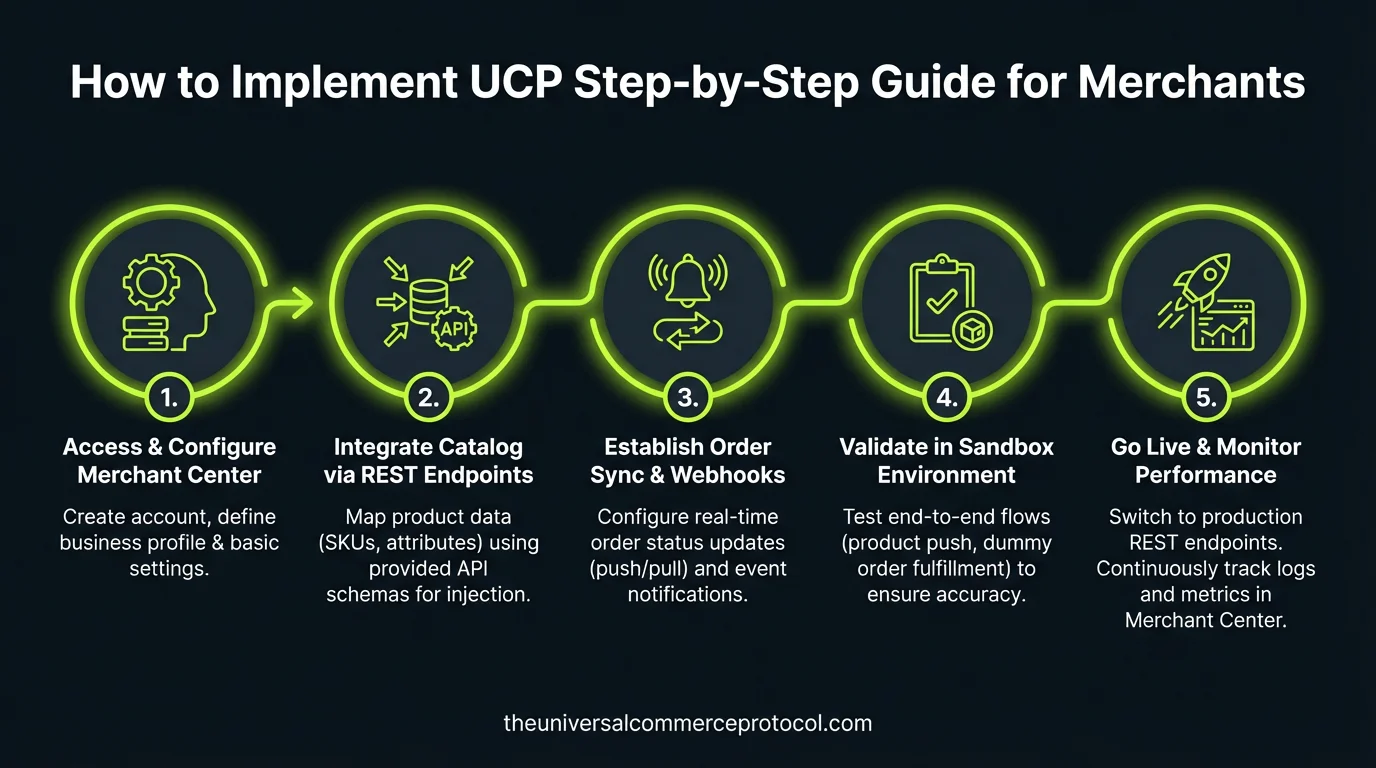
Implementing the Universal Commerce Protocol (UCP) means enabling your store to accept purchases directly inside Google AI Mode in Search and the Gemini app — without replacing your existing checkout infrastructure, without surrendering your customer relationships, and without becoming dependent on a single payment provider.
This guide walks through the official implementation steps for merchants integrating UCP with Google’s AI surfaces. It is based entirely on the Google UCP Implementation Guide, which is the authoritative reference for this integration. Every step described here links back to the relevant official documentation so you can verify and follow the source directly.
Important: UCP integration with Google’s AI surfaces currently requires approval. Merchants must join the waitlist before going live. The waitlist link is provided in Step 1 below.
Before You Begin: What UCP Integration Requires
Before starting technical implementation, it is important to understand what UCP integration with Google entails at a structural level:
- You remain the Merchant of Record. All transactions processed through UCP remain yours. You retain full ownership of customer relationships, transaction data, and the post-purchase experience. Google does not become a party to the sale.
- Your existing checkout is not replaced. UCP integrates with your existing business logic. You implement standardized endpoints that UCP-compatible agents can communicate with — your backend commerce systems continue to operate as they do today.
- Google Pay is the payment method for Google surface integrations. For transactions occurring inside AI Mode and Gemini, payment is processed using funding credentials stored in Google Wallet via Google Pay. Your payment service provider must be able to accept a payment token from Google Pay. Many PSPs already support the Google Pay API; if yours does not, the PSP can follow the steps outlined in Google’s documentation.
- Google approval is required. Your integration must be approved by Google before you can go live on Google AI Mode and Gemini. This is not a self-serve integration at this stage.
Source for all of the above: Google UCP Developer Guide and Google UCP FAQ.
The Five-Step Implementation Path
Google’s official documentation describes UCP integration in five sequential steps. Here is each step in detail, with direct links to the relevant documentation.
Step 1: Prepare Your Merchant Center Account
Your Merchant Center account is the starting point and the data hub for your UCP integration. Before proceeding to any technical implementation, you must ensure your Merchant Center account is fully configured:
- Product feed: Your product feed must be current and accurate. The product listing data in Merchant Center is what Google’s AI surfaces use to surface your products to shoppers during discovery.
- Shipping configuration: Shipping options, zones, rates, and carrier settings must be fully configured in Merchant Center.
- Returns configuration: Your returns policy must be documented in Merchant Center.
- native_commerce attribute: Only product listings that include the
native_commerceproduct attribute will display the Buy button for the UCP-powered checkout experience. This attribute must be added to your product feed.
Once your Merchant Center account is prepared, join the waitlist to initiate contact with Google for UCP implementation. Your integration must be approved before going live. Waitlist: UCP Integration Interest Form.
Full documentation: Prepare your Merchant Center account.
Step 2: Publish Your Business Profile
Your UCP business profile is the machine-readable declaration of what your store supports — the capabilities, payment handlers, and public keys that Google’s systems will use to negotiate transactions with your backend.
This profile is published at a standardized, well-known endpoint on your domain: /.well-known/ucp. When Google’s AI surfaces encounter your products and a shopper initiates a purchase, they fetch this profile to discover what you support and negotiate the transaction parameters accordingly.
The business profile serves two specific functions in the Google integration:
- It allows Google to negotiate services and capabilities with your backend
- It exposes your payment handlers and public keys for signature verification of transactions
Full documentation: Publish your business profile.
Step 3: Implement the Three Core Checkout Endpoints
The heart of UCP merchant integration is implementing three REST endpoints that handle the checkout session lifecycle. These are the standardized interfaces through which Google’s AI surfaces initiate and complete purchases on your behalf.
- Session creation endpoint — receives a request to initiate a new checkout session and returns the initial session state including available line items, totals, fulfillment options, and payment handlers
- Session update endpoint — receives updates to session parameters (shipping address selection, fulfillment option selection, coupon application, etc.) and returns the updated session state
- Session completion endpoint — receives the final completion request with payment token and confirms the order
Full documentation for native checkout: Native checkout implementation.
Step 3 (Optional): Implement Embedded Checkout
For merchants with checkout flows that require complex logic or customization — specific regulatory requirements, mandatory delivery window selection, specialized confirmation steps — UCP also supports an embedded checkout path. In this model, your checkout UI is embedded within the Google AI surface, with bi-directional messaging between Google and your backend.
This is an optional addition to the native checkout integration, not a replacement for it. Full documentation: Embedded checkout implementation.
Step 4: Choose Your User Identification Path
UCP supports two approaches to user identification, and you choose which to implement based on your business requirements:
Guest checkout (default): No additional implementation is required beyond the steps above. Shoppers transact without account linking. Payment credentials and shipping information come from Google Wallet.
Account-linked checkout: Implement OAuth 2.0 to sync user profiles between your platform and Google. This enables loyalty program integration, member-specific pricing, saved preferences, and personalized checkout experiences. This path requires publishing an OAuth authorization server configuration at /.well-known/oauth-authorization-server.
Full documentation: Identity linking implementation.
Step 5: Sync Order Status
After a transaction is completed, merchants must push order status updates back to Google via webhooks. This keeps the buyer’s view of their order current within Google’s surfaces — covering order confirmation, shipment tracking, and delivery status.
Full documentation: Order lifecycle implementation.
Payment: How Google Pay Works in UCP
For transactions occurring inside Google’s AI surfaces, payment is processed using Google Pay with funding credentials stored in Google Wallet. This is how the mechanics work, per official documentation:
- Shoppers use payment methods and shipping information already saved in Google Wallet
- You do not need to enable the Google Pay API buy button on your existing checkout surfaces to participate in UCP
- Your payment service provider must be able to accept a payment token from Google Pay. Most major PSPs already support this.
- If your PSP is not integrated with the Google Pay API, the PSP can follow Google’s integration steps independently
Google Pay setup documentation: Google Pay payment handler. Note your Merchant ID from the top right corner of the Google Pay and Wallet Console — it is required in later implementation steps. Source: Google UCP FAQ.
What UCP Integration Does Not Require
Several common concerns about UCP integration are addressed directly in Google’s official FAQ. For clarity:
- You do not need to replace your payment provider. UCP is compatible with existing PSP integrations as long as they support Google Pay tokenization.
- You do not need to rebuild your checkout flow. UCP maps 1:1 to standard retail operations such as checkout, and is designed for low-lift integration that aligns with your existing business logic. Source: Google UCP FAQ.
- You do not lose your customer data. Merchants retain full ownership of their customer relationships, data, and the post-purchase experience.
Code Samples and Developer Resources
- Google UCP Implementation Guide — complete step-by-step documentation
- Google UCP Code Samples
- UCP GitHub Repository — open-source specification, SDKs, and reference implementations
- UCP Sample Implementations
- ucp.dev — the full UCP technical specification and documentation
- Join the UCP Integration Waitlist
Primary Sources for This Article
- Google UCP Implementation Guide (developers.google.com)
- Google UCP FAQ (developers.google.com)
- Google UCP Developer Guide overview (developers.google.com)
- Universal Commerce Protocol official documentation (ucp.dev)
- Google Merchant Center Help: About UCP and UCP-powered checkout
🎙️ The UCP Brief — Audio Summary
Read transcript
Welcome to The UCP Brief. Today, we’re diving into the Universal Commerce Protocol, or UCP, and how merchants can actually implement it. Google’s laying the groundwork for a future where you can buy directly from AI interfaces like Search and Gemini, and UCP is the key. The big takeaway here is that UCP lets you tap into these new AI-driven sales channels without having to rebuild your entire e-commerce setup.
Think of UCP as a translator. It allows Google’s AI to talk to your existing systems. You don’t replace your checkout, you don’t surrender customer data, and you’re still the Merchant of Record. Your website and backend processes continue running as they always have.
Now, implementing UCP involves a five-step process according to Google’s official documentation. It starts with your Google Merchant Center account. You need to make sure your product feed is accurate and up-to-date, and your shipping configurations are completely dialed in. This is the foundation, ensuring Google’s AI has the right information about your products and how you deliver them.
One more critical point: Google approval is required before you can go live with UCP. You’ll need to join a waitlist. This isn’t a self-serve operation just yet. But getting in early could give you a significant edge as AI commerce continues to evolve.
I’m Will Tygart. Stay curious.
🎙️ The UCP Brief — Audio Summary
Read transcript
Welcome to The UCP Brief. Today we’re diving into the Universal Commerce Protocol, or UCP. It’s a game changer that lets customers buy directly from you inside Google’s AI Search and Gemini, and the best part is you don’t have to ditch your current checkout system. Think of it as opening up a new sales channel without rebuilding your entire store.
The article we’re looking at today is a step-by-step guide for merchants on how to implement UCP, and the key takeaway is this: you stay in control. You remain the Merchant of Record, you own the customer relationships, and your existing business logic keeps humming along. Google’s just providing the platform for a smoother, more integrated buying experience.
The implementation process involves five steps, starting with your Merchant Center account. You’ll need to make sure your product feed is up-to-date and your shipping settings are accurate. Remember, Google’s AI uses this data to showcase your products, so garbage in, garbage out. Also, Google Pay is the payment method for these transactions, so your payment provider needs to be able to handle Google Pay tokens.
One final but crucial point: Google approval is required before you can go live with UCP. It’s not a self-serve system yet, so you’ll need to join the waitlist. But the potential benefits of reaching customers directly through Google’s AI surfaces make it well worth exploring.
I’m Will Tygart. Stay curious.
Frequently Asked Questions
What is the Universal Commerce Protocol (UCP)?
The Universal Commerce Protocol (UCP) is an open standard developed to enable AI agents to autonomously conduct commerce transactions across any platform.
How does UCP enable agentic commerce?
UCP provides standardized APIs and protocols so AI agents can discover products, negotiate terms, and complete purchases without human intervention, working across any compatible commerce platform.
Why should businesses implement UCP?
UCP adoption reduces integration costs, opens revenue channels to AI-driven buyers, and future-proofs commerce infrastructure as agentic purchasing becomes mainstream.
Leave a Reply