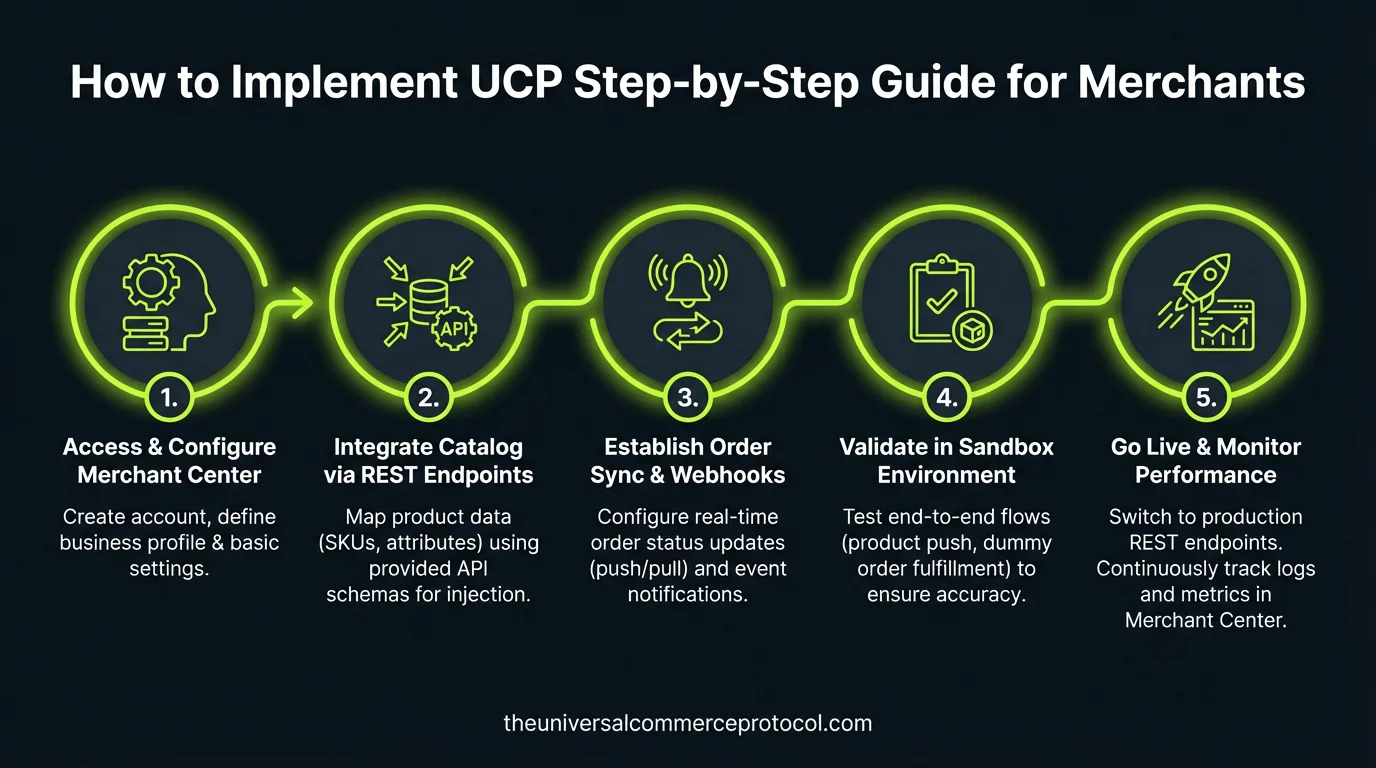
Implementing the Universal Commerce Protocol (UCP) means enabling your store to accept purchases directly inside Google AI Mode in Search and the Gemini app — without replacing your existing checkout infrastructure, without surrendering your customer relationships, and without becoming dependent on a single payment provider.
This guide walks through the official implementation steps for merchants integrating UCP with Google’s AI surfaces. It is based entirely on the Google UCP Implementation Guide, which is the authoritative reference for this integration. Every step described here links back to the relevant official documentation so you can verify and follow the source directly.
Important: UCP integration with Google’s AI surfaces currently requires approval. Merchants must join the waitlist before going live. The waitlist link is provided in Step 1 below.
November 2026 status: Direct checkout powered by UCP is live in the United States and, since November 4, 2026, for Canadian shoppers in AI Mode in Search and the Gemini app with launch partners lululemon, select Shopify merchants, Shoppers Drug Mart and Simons, paid with Google Pay from Wallet with the retailer as seller of record. Self-serve UCP integration inside Merchant Center for additional merchants is still a 2027 item. Google’s merchant surfaces implement UCP version 2026-04-08 while the current specification is 2026-08-25; REST is Google’s recommended default and the only transport supported for Merchant Center self-serve validation. Request authentication is RFC 9421 ES256 signature verification, not headers alone.
Before You Begin: What UCP Integration Requires
Before starting technical implementation, it is important to understand what UCP integration with Google entails at a structural level:
Merchant Implementation Milestone & Verification Matrix
Production deployment roadmap defining deliverables, security requirements, and verification protocols across the 5 core phases of UCP merchant integration.
| Integration Phase | Traditional Commerce API | UCP Protocol Specification | Artifact / Payload | Developer SLA | Verification Standard |
|---|---|---|---|---|---|
| Discovery Manifest | Custom developer portal docs requiring manual API key generation. | /.well-known/ucp.json RFC 8615 standardized endpoint. | Signed JSON capability manifest body. | <1 developer hour. | DNSSEC & CORS origin verification. |
| Catalog Synchronization | Nightly CSV or FTP product feed exports with stale stock data. | Real-time JSON-LD Catalog API with variant graphs. | Schema.org OfferCatalog with millisecond TTL. | Sub-100ms response time. | Merchant Center schema validator test. |
| Quote Negotiation | Static server-side cart calculation with unexpected shipping updates. | Cryptographically signed Quote Token with 15-minute lock. | Signed quote payload with DDP tax breakdown. | Sub-250ms execution SLA. | RFC 9421 cryptographic signature validation. |
| Biometric Settlement | Hosted payment iframe redirect requiring human credential entry. | Headless FIDO AP2 WebAuthn token exchange. | Hardware-attested biometric assertion token. | Sub-500ms settlement confirmation. | Zero-liability card scheme compliance (Visa CE3.0). |
| Fulfillment Webhooks | Polling /orders cron jobs every 15 minutes causing high server load. | Cryptographically signed HMAC-SHA256 push webhooks. | Standard UCP order event envelope with sequence ID. | Immediate (<50ms) event dispatch. | Idempotency-Key Redis locking verification. |
- You remain the Merchant of Record. All transactions processed through UCP remain yours. You retain full ownership of customer relationships, transaction data, and the post-purchase experience. Google does not become a party to the sale.
- Your existing checkout is not replaced. UCP integrates with your existing business logic. You implement standardized endpoints that UCP-compatible agents can communicate with — your backend commerce systems continue to operate as they do today.
- Google Pay is the payment method for Google surface integrations. For transactions occurring inside AI Mode and Gemini, payment is processed using funding credentials stored in Google Wallet via Google Pay. Your payment service provider must be able to accept a payment token from Google Pay.
- Google approval is required. Your integration must be approved by Google before you can go live on Google AI Mode and Gemini. This is not a self-serve integration at this stage.
Source for all of the above: Google UCP Developer Guide and Google UCP FAQ.
The Five-Step Implementation Path
Google’s official documentation describes UCP integration in five sequential steps. Here is each step in detail, with direct links to the relevant documentation.
Step 1: Prepare Your Merchant Center Account
Your Merchant Center account is the starting point and the data hub for your UCP integration. Before proceeding to any technical implementation, you must ensure your Merchant Center account is fully configured:
Google describes Merchant Center preparation and an approval-gated start for additional merchants; specific feed attributes and configuration paths are not verified on current sheets and are omitted here. Self-serve Merchant Center integration is a 2027 item.
Google states direct checkout remains available for select merchants only. Check Google’s current UCP interest form for the present start route.
Full documentation: Prepare your Merchant Center account.
Step 2: Publish Your Business Profile
Your UCP business profile is the machine-readable declaration of what your store supports — the capabilities, payment handlers, and public keys that Google’s systems will use to negotiate transactions with your backend.
This profile is published at a standardized, well-known endpoint on your domain: /.well-known/ucp. When Google’s AI surfaces encounter your products and a shopper initiates a purchase, they fetch this profile to discover what you support and negotiate the transaction parameters accordingly.
The business profile serves two specific functions in the Google integration:
- It allows Google to negotiate services and capabilities with your backend
- It exposes your payment handlers and public keys for signature verification of transactions
Full documentation: Publish your business profile.
Step 3: Implement the Three Core Checkout Endpoints
The heart of UCP merchant integration is implementing three REST endpoints that handle the checkout session lifecycle. These are the standardized interfaces through which Google’s AI surfaces initiate and complete purchases on your behalf.
Google recommends REST for native checkout. Endpoint contracts are not verified on current sheets and are omitted here — follow Google’s native-checkout documentation for the current contract.
Full documentation for native checkout: Native checkout implementation.
Step 3 (Optional): Implement Embedded Checkout
For merchants with checkout flows that require complex logic or customization — specific regulatory requirements, mandatory delivery window selection, specialized confirmation steps — UCP also supports an embedded checkout path. An embedded path is described in Google’s documentation; its mechanics are not verified on current sheets and are omitted here.
This is an optional addition to the native checkout integration, not a replacement for it. Full documentation: Embedded checkout implementation.
Step 4: Choose Your User Identification Path
UCP supports two approaches to user identification, and you choose which to implement based on your business requirements:
Guest checkout (default): No additional implementation is required beyond the steps above. Shoppers transact without account linking. Payment credentials and shipping information come from Google Wallet. For loyalty concepts see loyalty.
Full documentation: Identity linking implementation.
Step 5: Sync Order Status
Order-update mechanics are not verified on current sheets and are omitted here. Background: webhooks.
Full documentation: Order lifecycle implementation.
Payment: How Google Pay Works in UCP
For transactions occurring inside Google’s AI surfaces, payment is processed using Google Pay with funding credentials stored in Google Wallet. This is how the mechanics work, per official documentation:
- Shoppers use payment methods and shipping information already saved in Google Wallet
- Your payment service provider must be able to accept a payment token from Google Pay. Most major PSPs already support this.
Google Pay setup documentation: Google Pay payment handler. Reference: Google UCP FAQ. Your PSP must process Google Pay tokens and you must provide your Google Pay configuration in your UCP profile.
What UCP Integration Does Not Require
Several common concerns about UCP integration are addressed directly in Google’s official FAQ. For clarity:
- You do not need to replace your payment provider. UCP is compatible with existing PSP integrations as long as they support Google Pay tokenization.
- You do not need to rebuild your checkout flow. UCP maps 1:1 to standard retail operations such as checkout, and is designed for low-lift integration that aligns with your existing business logic. Source: Google UCP FAQ.
- You do not lose your customer data. Merchants retain full ownership of their customer relationships, data, and the post-purchase experience.
Code Samples and Developer Resources
- Google UCP Implementation Guide — complete step-by-step documentation
- Google UCP Code Samples
- UCP GitHub Repository — see also UCP Sample Implementations
- ucp.dev — the full UCP technical specification and documentation
- Join the UCP Integration Waitlist
Primary Sources for This Article
- Google UCP Implementation Guide (developers.google.com)
- Google UCP FAQ (developers.google.com)
- Google UCP Developer Guide overview (developers.google.com)
- Universal Commerce Protocol official documentation (ucp.dev)
- Google Merchant Center Help: About UCP and UCP-powered checkout
Archival audio from March 2026 — the five-step and waitlist language below is superseded by the November 2026 status box above.
🎙️ The UCP Brief — Audio Summary
Read transcript
Welcome to The UCP Brief. Today, we’re diving into the Universal Commerce Protocol, or UCP, and how merchants can actually implement it. Google’s laying the groundwork for a future where you can buy directly from AI interfaces like Search and Gemini, and UCP is the key. The big takeaway here is that UCP lets you tap into these new AI-driven sales channels without having to rebuild your entire e-commerce setup.
Think of UCP as a translator. It allows Google’s AI to talk to your existing systems. You don’t replace your checkout, you don’t surrender customer data, and you’re still the Merchant of Record. Your website and backend processes continue running as they always have.
Now, implementing UCP involves a five-step process according to Google’s official documentation. It starts with your Google Merchant Center account. You need to make sure your product feed is accurate and up-to-date, and your shipping configurations are completely dialed in. This is the foundation, ensuring Google’s AI has the right information about your products and how you deliver them.
One more critical point: Google approval is required before you can go live with UCP. You’ll need to join a waitlist. This isn’t a self-serve operation just yet. But getting in early could give you a significant edge as AI commerce continues to evolve.
I’m Will Tygart. Stay curious.
🎙️ The UCP Brief — Audio Summary
Read transcript
Welcome to The UCP Brief. Today we’re diving into the Universal Commerce Protocol, or UCP. It’s a game changer that lets customers buy directly from you inside Google’s AI Search and Gemini, and the best part is you don’t have to ditch your current checkout system. Think of it as opening up a new sales channel without rebuilding your entire store.
The article we’re looking at today is a step-by-step guide for merchants on how to implement UCP, and the key takeaway is this: you stay in control. You remain the Merchant of Record, you own the customer relationships, and your existing business logic keeps humming along. Google’s just providing the platform for a smoother, more integrated buying experience.
The implementation process involves five steps, starting with your Merchant Center account. You’ll need to make sure your product feed is up-to-date and your shipping settings are accurate. Remember, Google’s AI uses this data to showcase your products, so garbage in, garbage out. Also, Google Pay is the payment method for these transactions, so your payment provider needs to be able to handle Google Pay tokens.
One final but crucial point: Google approval is required before you can go live with UCP. It’s not a self-serve system yet, so you’ll need to join the waitlist. But the potential benefits of reaching customers directly through Google’s AI surfaces make it well worth exploring.
I’m Will Tygart. Stay curious.
Related reading
Updated November 8, 2026: re-verified Merchant-of-Record, Google Pay, and /.well-known/ucp profile discovery against current sheets, removed unverified Merchant Center, endpoint, identity-linking and webhook setup detail, and added U.S.–Canada live status and 2027 self-serve timing. First published March 7, 2026.
Related Engineering Specifications & Verification Guides
- Google Universal Cart & Agentic Checkout: Complete Technical Architecture (Google I/O 2026)
- Which Payment Networks Have Shipped Agent Payment Rails? (Network Scorecard & UCP Matrix)
- How Payment Networks Verify AI Agents: Identity, Mandates & FIDO AP2 Proofs
- UCP Idempotency Keys: Technical Specification & Redis Locking Runbook
- Payment Failures in Agentic Commerce: The 8-Tier Exception Hierarchy & Recovery Matrix
- UCP Shopify Metafields: Map Custom Data for AI Agents (GraphQL Mapping Guide)
- How Shopify, Etsy & Walmart Are Implementing UCP: The Enterprise Ecosystem Matrix
- UCP Compliance Checklist for Merchants 2026: Merchant Risk & Liability Matrix
Related UCP Guides & Specifications
- Implementing UCP Webhooks for Real-Time Notifications — developer walkthrough for signed order and inventory events.
- UCP Webhook Reliability: Production Guide — dead-letter queues, exponential backoff, and idempotent consumers.
- UCP Webhook Security & Event Verification — HMAC signature validation and replay protection.
- UCP API Rate Limits & Performance Optimization — token-bucket quotas, caching headers, and agent throttling.
- Adyen Agentic Unlocks AI Commerce for UCP, AP2, ACP Integration
- ESW Launches Agentic Commerce with Microsoft Copilot: UCP Integration
- UCP Developer Guide: Building Agentic Commerce
- POS Integration for Restaurant Onboarding: UCP's Fast Track
Frequently Asked Questions
What are the core technical prerequisites for a merchant integrating UCP?
Merchants require an HTTPS domain supporting root-level URL rewrites (for the /.well-known/ucp.json endpoint), an existing product catalog with SKU/GTIN identifiers, and a payment gateway capable of processing tokenized transactions.
How long does a standard UCP developer implementation take from scratch?
A foundational integration (discovery endpoint + product catalog API) takes 1-2 developer days, while a full end-to-end integration including headless cart quoting and biometric settlement typically takes 5-10 developer days.
Does implementing UCP require merchants to rebuild their ecommerce infrastructure?
No. UCP operates as an open interoperability protocol layer that mounts in front of existing Shopify, WooCommerce, Magento, or custom enterprise backends, translating standard agent payloads into native platform calls.
Leave a Reply