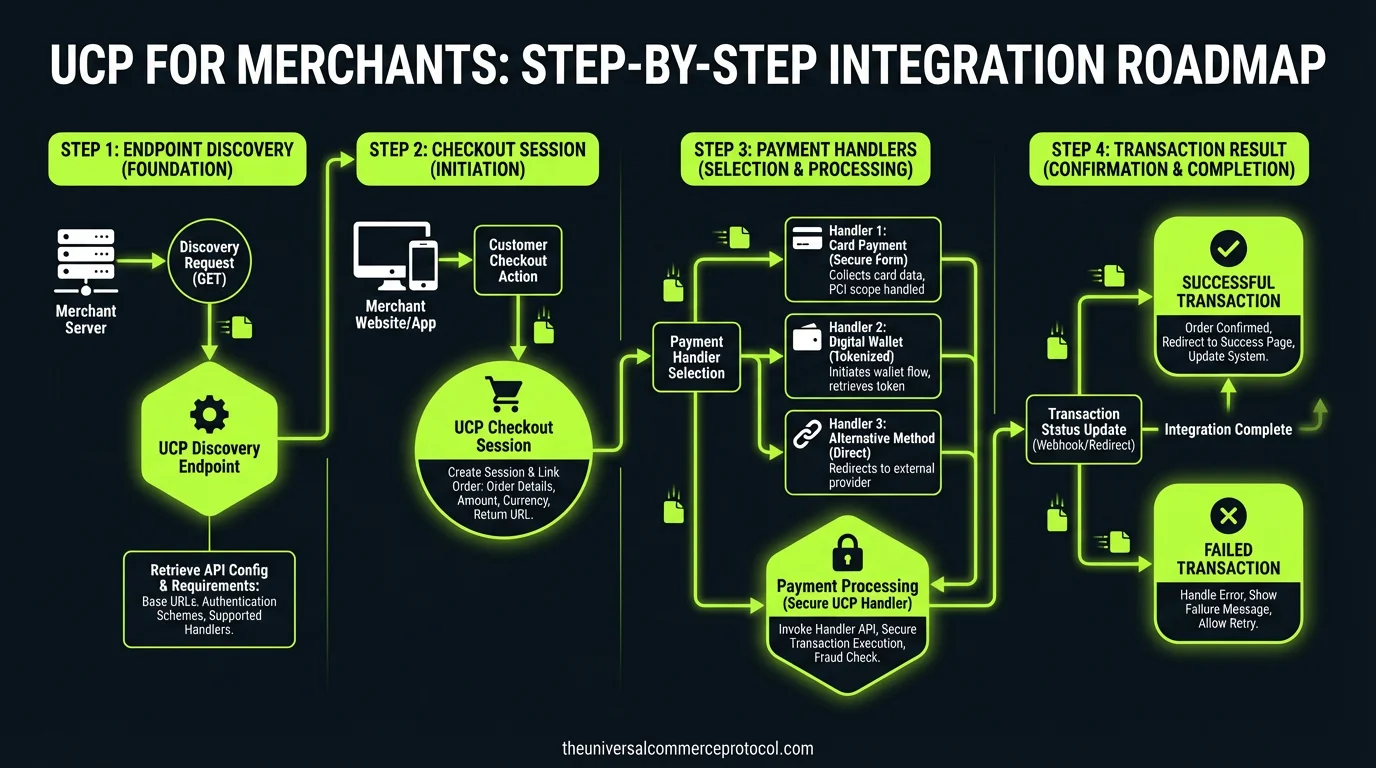
Integrating with the Universal Commerce Protocol (UCP) transforms your online store from a browser-only destination into a machine-readable commerce node that AI agents can discover, query, and transact with autonomously. This guide walks merchants through every step of the integration process — from initial Merchant Center configuration to serving your first UCP-powered checkout session.
/.well-known/ucp discovery document.
Prerequisites: What You Need Before You Start
Before beginning your UCP integration, confirm you have the following in place:
An active Google Merchant Center account with your product feed already configured and approved. UCP uses your Merchant Center ID (merchant_id) as the primary identifier that links your product data to the agentic layer. If you do not have a Merchant Center account, create one at merchants.google.com and complete the product feed setup before proceeding.
Your ecommerce platform must support serving custom JSON endpoints. If you are on Shopify, the UCP integration is managed centrally through the Shopify Admin — you can skip most of the manual endpoint configuration and proceed to the Shopify-specific section below. For custom-built stores, WooCommerce, BigCommerce, or Magento, you will need server-side access to create and serve REST API endpoints.
Your products must be eligible for checkout in the United States. As of early 2026, UCP checkout is available only for products with U.S. eligibility on participating merchant accounts.
Step 1: Configure the Discovery Endpoint
The /.well-known/ucp endpoint is the programmatic front door for AI agents. It is a JSON document served at a predictable URL that tells any UCP-compatible agent exactly how to interact with your store — which capabilities you support, which checkout paths are available, and which API endpoints to call.
Your discovery document must be served as application/json at https://yourdomain.com/.well-known/ucp. The minimum viable discovery document includes your merchant_id, supported capabilities, and API base URL. Here is the essential structure:
The services object is where you declare how agents can interact with your store. UCP supports multiple transport bindings: rest for standard API-based checkout, mcp for Model Context Protocol integration, a2a for Agent2Agent communication, and embedded for an iframe-based checkout experience. The default REST API path — which Google calls the “Native” integration — processes transactions entirely through UCP’s standardized endpoints. The embedded transport is an optional path for approved merchants who need to maintain a fully custom, branded checkout UI rendered within the AI surface via iframe.
Step 2: Set Up Product Catalog API Endpoints
UCP agents need to query your product catalog in real time. This goes beyond your static Merchant Center feed — agents may request current pricing, real-time inventory availability, and product variant details. You need to serve at minimum a product listing endpoint and a single-product detail endpoint.
Your product API should return structured data that includes the product title, description, price (with currency), availability status, image URLs, and any variant options such as size or color. The response format should follow UCP’s product schema, which extends standard Merchant Center product attributes with additional fields for agent consumption.
Step 3: Implement Checkout Session Endpoints
The checkout session is the core transactional primitive in UCP. When an AI agent is ready to complete a purchase on behalf of a shopper, it initiates a checkout session by sending a POST request to your checkout endpoint with the selected products, quantities, and the shopper’s shipping and payment information.
Your checkout endpoint must handle three phases: session creation (reserve inventory, calculate totals including tax and shipping), payment authorization (process the payment through your configured payment handler), and session confirmation (finalize the order and return an order ID to the agent).
UCP’s payment handler model means you do not need to change your existing payment processing. You declare which payment handlers you accept (Google Pay, Shop Pay, PayPal, etc.), and the agent selects one based on the shopper’s available credentials. The handler specification tells the agent exactly what payment data to provide.
Step 4: Declare Your Supported Extensions
UCP’s modular architecture separates core commerce primitives from optional extensions. Extensions cover capabilities like fulfillment options, loyalty program integration, post-purchase tracking, and returns processing. You only need to implement the extensions relevant to your business.
The dev.ucp.shopping.fulfillment extension covers standard shipping, local delivery, in-store pickup, and delivery window selection. If your store offers specialized fulfillment — for example, white-glove delivery for furniture or temperature-controlled shipping for perishables — you can define custom extensions that describe these capabilities to agents.
Step 5: Platform-Specific Integration Paths
Shopify Merchants
If your store runs on Shopify, the UCP integration is handled through Agentic Storefronts in the Shopify Admin. You do not need to build custom endpoints. Shopify manages the discovery document, product API, and checkout session handling on your behalf. Ensure your Shopify Catalog is up to date and your Merchant Center account is linked.
BigCommerce Merchants
BigCommerce merchants can leverage the Feedonomics data enrichment layer to structure product feeds for UCP compatibility. The platform is working on native UCP support — check your BigCommerce admin for updates on the Agentic Commerce integration.
WooCommerce and Custom Stores
For WooCommerce, you will need to build the UCP endpoints as custom REST API routes using the WordPress REST API infrastructure. This involves registering custom routes that serve the discovery document and handle product queries and checkout sessions. The /.well-known/ucp endpoint can be served via a simple rewrite rule or a dedicated plugin.
Step 6: Add the native_commerce Attribute
In your Google Merchant Center product feed, add the native_commerce attribute to products you want to be eligible for UCP checkout. This attribute signals to Google that these products can be purchased through the agentic checkout flow in AI Mode and Gemini. Without this attribute, your products may appear in AI search results but will not support direct purchase.
Step 7: Test and Validate
Before going live, validate your UCP implementation by confirming your discovery endpoint returns valid JSON at the correct URL with the correct Content-Type header, your product API returns accurate real-time pricing and inventory, your checkout session endpoint correctly handles the full create-authorize-confirm lifecycle, and your payment handlers are correctly declared and functional.
Google provides validation tools through Merchant Center to verify your UCP integration. Use these to catch configuration errors before your products appear in AI Mode.
Frequently Asked Questions
Do I need to be on Shopify to use UCP?
No. UCP is an open standard that works with any ecommerce platform. Shopify offers a managed integration path, but merchants on WooCommerce, BigCommerce, Magento, or custom-built platforms can implement UCP endpoints directly.
What is the native_commerce attribute in Merchant Center?
The native_commerce attribute is a product feed attribute that signals to Google which products are eligible for UCP-powered checkout. Products without this attribute may appear in AI results but will not support direct in-conversation purchasing.
Is UCP available outside the United States?
As of early 2026, UCP checkout is available only for products with U.S. eligibility. International expansion is expected but no timeline has been confirmed by Google.
Do I need to change my payment processor to use UCP?
No. UCP’s payment handler architecture works with your existing payment integrations. You declare which handlers you accept, and the protocol routes payments through your current processor.
What happens to my customer data with UCP?
You remain the Merchant of Record. UCP is designed so that merchants retain full ownership of customer data, relationships, and post-transaction activities.
How long does UCP integration typically take?
For Shopify merchants, integration is largely automatic through the Shopify Admin. For custom implementations, expect 2-4 weeks of development work depending on the complexity of your catalog and checkout flow.
🎙️ The UCP Brief — Audio Summary
Read transcript
Welcome to The UCP Brief. Today we’re diving into how merchants can actually implement the Universal Commerce Protocol, or UCP, and unlock the power of AI-driven commerce. Think of UCP as the Rosetta Stone for your online store, translating your product catalog and checkout process into a language that AI agents can understand and use to make purchases autonomously. The first crucial step is setting up your Google Merchant Center account. This isn’t just about getting your products listed on Google; it’s about establishing your merchant ID, which UCP uses as the key identifier to link your product data to the AI world. No Merchant Center, no UCP integration. It’s that simple. Next, you need to create a discovery endpoint. This is basically a digital welcome mat for AI agents, a simple JSON file at a predictable URL that tells them exactly how to interact with your store. It’s like giving the AI a map of your store, showing them where the products are, how to add them to a cart, and how to complete the purchase. Finally, remember that UCP offers different “transport bindings,” ways for AI agents to interact with your store. The “Native” integration is the standard, using standardized API endpoints. But there’s also an “embedded” option, allowing approved merchants to maintain a completely custom checkout experience within an iframe. The choice is yours, depending on your needs. I’m Will Tygart. Stay curious.
Leave a Reply