When your basement is flooding at 2 a.m. or you’ve just found mold behind your drywall, the last thing you need is a chatbot that gives you a generic, useless answer. We built our AI chat assistant to actually understand what you’re asking — not just match a few keywords. Here’s a plain-English look at how it works, and why it gives you better answers than a typical chatbot.
The Problem With Basic Chatbots
Most chatbots work like a simple search engine from 2005: they look for exact word matches. Ask “how do I dry out my walls after a pipe burst?” and a keyword-only bot might show you an article about pipes or an article about walls — but not the one that explains structural drying after a plumbing leak, which is exactly what you need.
That’s the problem semantic search solves.
What Is Semantic Search?
Semantic search understands the meaning of your question, not just the individual words in it. It can recognize that “my ceiling is dripping” and “active water leak from above” are asking about the same situation — even though they share no words in common.
Under the hood, every piece of content in our knowledge base is converted into a list of 768 numbers (called a vector embedding) that captures the meaning of that text. When you ask a question, your question is converted into its own vector. We then find all the content whose meaning is closest to yours — and use that to form the answer.
Think of it like a library where books are arranged by topic meaning instead of alphabetical order. A librarian using semantic search can hand you the right book even if you can’t remember the title.
Our Full Search Pipeline — Step by Step
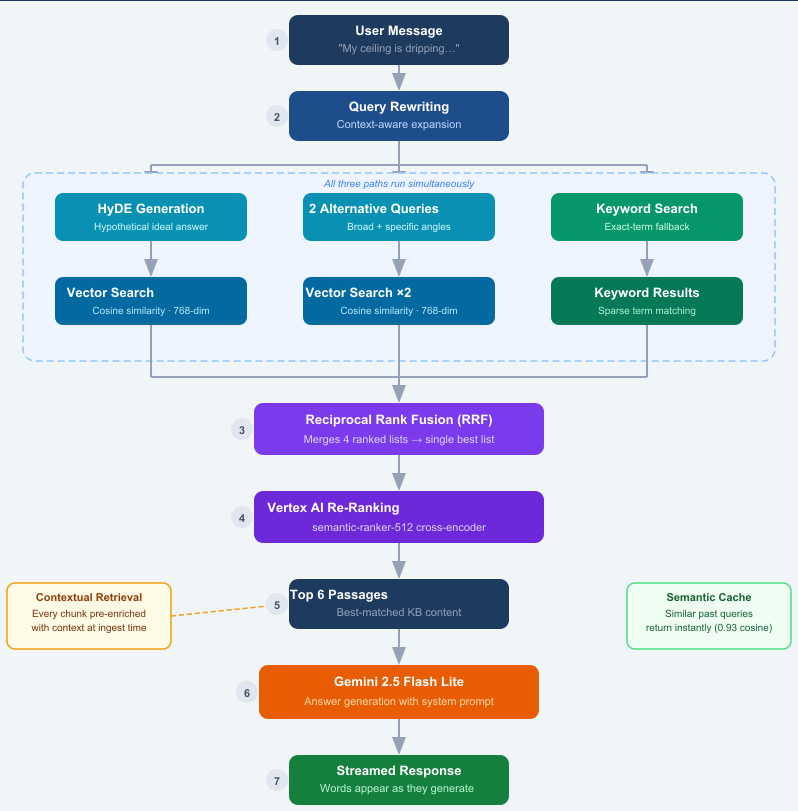
Below is the exact workflow our chat assistant follows every time you ask a question. We’ll walk through each step.
Step 1 — Query Rewriting
When you send a message, the assistant first rewrites it into a richer, more specific search query. If you say “tell me more” as a follow-up, it uses the previous conversation to understand what you actually mean — for example, expanding it into “structural drying timeline after a burst pipe water damage event.”
Step 2 — Three Parallel Retrieval Paths
Rather than searching once, the system searches three different ways at the same time:
- HyDE (Hypothetical Document Embedding): The AI generates what a perfect answer would look like, then finds real content that matches that ideal answer. This dramatically improves recall for questions where the exact wording in our knowledge base differs from how you phrased it.
- Alternative Query Angles: Two reformulations of your question — one broader, one more specific — are searched in parallel, so we catch content that a single query would miss.
- Keyword Search: A fast keyword filter runs alongside the vector searches to catch exact-term matches that embeddings occasionally miss (for example, specific product names or codes).
Step 3 — Reciprocal Rank Fusion (RRF)
We now have three ranked lists of results from vector search and one from keyword search. Reciprocal Rank Fusion merges them into a single, better-ranked list. A piece of content that appeared near the top of multiple search paths gets boosted — this is a principled way to combine different signals without just stacking lists on top of each other.
Step 4 — AI Re-Ranking
The merged list of candidates is passed to a dedicated cross-encoder model (Google’s Vertex AI Ranking API) that was specifically trained to score query-document relevance. Unlike the original vector search, the re-ranker reads your exact question and each candidate passage side-by-side, and scores how directly each one answers your question. The top 6 passages survive.
Step 5 — Contextual Retrieval (the secret sauce)
Here’s something we did at ingestion time (when we first loaded our articles into the system): every chunk of text was given a 1–2 sentence context summary explaining where it came from in the article and what concept it covers. This technique — called Contextual Retrieval — means each passage carries its own context, so the AI isn’t just reading a fragment that’s been ripped out of its original meaning.
For example, instead of just storing:
“Dehumidifiers should run continuously for 3–5 days.”
We store:
“This passage is from an article on structural drying after water damage. It explains the typical drying timeline for building materials using industrial dehumidifiers. — Dehumidifiers should run continuously for 3–5 days.”
That context travels with the chunk through every search, so the final answer is grounded in the right topic.
Step 6 — Answer Generation with Gemini
The top 6 passages, along with the conversation history and current article context, are sent to Gemini 2.5 Flash. The model is given strict instructions: answer from the knowledge base content, stay under 100 words unless more detail is genuinely needed, and always prioritize safety for emergencies. The answer is then streamed back to you word by word — so you see a response forming in real time rather than waiting for the full reply.
What This Means for You as a Homeowner
- You don’t need the right words. Ask about “wet walls,” “flooded floor,” or “black stuff on my ceiling” — the assistant understands what you mean, not just what you typed.
- You get answers from real content, not hallucinations. Every response is grounded in articles written by our restoration team. The AI is not making things up.
- Emergency questions get priority routing.If you mention active flooding, a burst pipe, sewage backup, or any other emergency, the system immediately connects you to our 24/7 emergency line and routes you to the lead form for a fast callback. No waiting through a chatbot script.
- Context carries forward. If you ask a follow-up question without repeating the full situation, the assistant remembers the last several messages and searches accordingly.
Why We Built It This Way
Restoration emergencies don’t follow a script. We’ve seen every combination — homeowners who don’t know what kind of damage they have, insurance policyholders who don’t know what’s covered, property managers dealing with a leak on the 10th floor at midnight. A keyword chatbot would fail most of those conversations.
The semantic pipeline described above means our assistant can handle an open-ended, natural conversation and still surface the most relevant information from our knowledge base — whether you’re asking about the mold remediation process, what Category 3 water means, or whether your homeowner’s policy typically covers storm damage.
Leave a Reply